

A software training plan is a documented, role-based program that maps learning objectives, delivery methods, and assessments to measurable outcomes. It defines who gets trained on what, when, and how success is checked. Done well, it shortens the time it takes new users to reach full productivity and cuts costly errors. This guide includes template fields and a seven-step rollout you can start using today.
TL;DR:
- A formal training plan must address role-based differentiation and measurable assessments to avoid common failures like ad hoc sessions and untracked learning.
- Developing a role-tiered structure with checkpoints and tailored modules ensures effective skill progression and reduces time-to-competency.
- Using varied delivery formats such as hands-on labs, instructor-led sessions, and spaced repetition enhances engagement and retention.
- Continuous measurement through completion rates, assessment scores, and feature usage helps justify training investments and identifies improvement areas.
- Ongoing support, refresher sessions, and version control are crucial for maintaining training relevance and effectiveness after software deployment.
Table of Contents
- What Is a Software Training Plan, and When Do You Need One?
- Core Components and Template Fields to Include
- How Do You Create a Training Plan Step by Step?
- Setting Role-Based Requirements and Learning Paths
- Which Delivery Formats and Engagement Techniques Work Best?
- How Do You Measure Training Effectiveness?
- Actionable Training Plan Checklist and Example
- The Strategy Haus Approach to Training Plan Execution
- Considerations for Different Types of Software
- Tailoring Training for Different Learner Skills and Styles
- Keeping Support and Refresher Training Going After Launch
- Budgeting and Resource Allocation for Training Programs
- Common Challenges in Rolling Out Software Training Plans
- Lessons From Real Software Training Rollouts
- Get Hands-On Help Turning Your Training Plan Into Results
- Selected Authoritative Templates and Guidance
- Sources
What Is a Software Training Plan, and When Do You Need One?
A software training plan is a written document that sets out who needs to learn a system, what they need to know, and how you'll confirm they learned it. It can cover a single tool rollout or an entire platform migration across departments.
You need a formal plan any time one of these events hits: a major software rollout, a wave of new hires who'll touch the system, a compliance requirement tied to a regulated process, or a significant upgrade that changes workflows people already rely on. Smaller tweaks, like a minor feature update, usually don't require a full rewrite. A short addendum works fine.
Most training failures trace back to skipping this step and running ad hoc sessions instead. Two problems show up again and again: no role differentiation, so a brand-new hire and a five-year veteran sit through the identical session, and no way to measure whether anyone actually learned anything. A plan fixes both by forcing you to define roles and checkpoints before training day arrives.
Core Components and Template Fields to Include
A usable training plan template needs specific fields, not vague headers. Each one has a job to do:
- Purpose: One sentence stating why this training exists. Example: "Prepare the sales team to use the new CRM before the March 2026 go-live."
- Scope: What's covered and what isn't. Example: "Covers lead entry and pipeline tracking. Excludes admin configuration."
- Audience and roles: Named groups, not job titles alone. Example: "Account executives (beginner), sales managers (journeyman), sales ops (senior/admin)."
- Learning objectives: What each role can do after training. Example: "Create a lead record in under two minutes without help."
- Modules: The actual content blocks, sequenced by role path.
- Timeline: Start date, session dates, and rollout deadline.
- Delivery method: Instructor-led, self-paced, hands-on lab, or a blend.
- Resources: LMS links, sandbox environments, printed job aids, budget.
- Responsibilities: Who owns each module, who delivers it, who tracks attendance.
- Assessments: Quiz, live demo, or supervisor sign-off tied to each objective.
- Records and versioning: Where completion data lives and how the document gets updated.
Governance matters as much as content. Name an owner for the document, set a review cycle (annual is standard, per NASA's software engineering guidance, with supplements after major releases), and version every edit so nobody trains off a stale copy.
How Do You Create a Training Plan Step by Step?
Building the plan is one task. Rolling it out without breaking things is another. This sequence, adapted from a proven seven-step framework, keeps both on track.
- Assess needs. Run a skills inventory, interview stakeholders across the roles who'll use the system, and pull usage data from any existing tool if you're replacing one. This tells you where the real gaps are, not where you assume they are.
- Define objectives and KPIs. Tie each learning objective to a business outcome. "Reduce order entry errors by improving field validation training" is a better objective than "understand the software."
- Design learning paths. Map modules to the role tiers you defined in the template. A journeyman path should skip material a beginner path spends an hour on.
- Develop materials and plan delivery. Build pre-work, hands-on labs, instructor-led sessions, or LMS modules based on what the content actually requires. Complex workflows need labs. Simple navigation changes don't.
- Pilot with a small cohort. Run the plan with 10 to 15 people before the full rollout. Collect feedback on pacing, clarity, and gaps, then adjust the materials before anyone else sees them.
- Roll out fully. Schedule sessions, recruit internal champions to support their teams post-training, and set sign-off criteria so managers know when their people are cleared to use the system independently.
- Measure and iterate. Revisit the plan on a set cadence, usually tied to the annual planning cycle, and update it whenever the software changes enough to make existing modules inaccurate.
Piloting isn't optional if you want the rollout to go smoothly. Feedback from a small cohort catches confusing instructions and unrealistic timelines before they become complaints from fifty people instead of five.
Setting Role-Based Requirements and Learning Paths
Training everyone the same way wastes senior employees' time and underprepares beginners. A three-tier structure solves this without adding real complexity.
- Beginner: Can complete core tasks with guidance. Example: enter a new customer record using a job aid.
- Journeyman: Works independently on standard tasks and troubleshoots common issues. Example: resolves a failed sync without escalating.
- Senior/admin: Configures the system, trains others, and handles edge cases. Example: builds a new report template or manages user permissions.
Set progression gates between tiers rather than letting time-in-role decide advancement. A quiz confirms conceptual knowledge, a live demo confirms applied skill, and supervisor sign-off confirms the person can be trusted with real work unsupervised. Require all three for roles tied to compliance or financial data; a quiz plus supervisor sign-off is usually enough for lower-risk roles.
Certification makes sense when the software touches regulated data or when a vendor requires it for support access. For everything else, on-the-job validation, watching someone actually perform the task correctly, tells you more than a certificate ever will.
Pro Tip: Skipping the senior tier is a common mistake. Experienced users need deeper technical training than anyone else, not less, because they're the ones colleagues will turn to for help once the trainers move on.
Which Delivery Formats and Engagement Techniques Work Best?
No single delivery format works for every audience. Matching the format to the content and the group size matters more than picking whichever tool is trendy.
- In-person, instructor-led: Best for complex workflows and small groups. Slower to scale, but high engagement.
- Virtual instructor-led: Scales across locations. Works well when paired with hands-on labs rather than passive screen-sharing.
- Self-paced/LMS: Good for straightforward navigation training. Weak for anything requiring judgment calls, since there's no one to ask.
- Hands-on labs: The strongest format for retention on any software task, according to engagement research from Endurance Learning, because learners perform the actual task instead of watching someone else do it.
Engagement tactics that measurably help: pre-work assignments so class time isn't wasted on basics, scavenger hunts that force navigation practice, realistic simulations, case studies pulled from actual workflows, and internal champions who answer questions after the formal session ends. Spaced repetition, a short refresher a week or two after the initial session, cuts the forgetting curve that kills most one-time training events.
Keep class sizes small enough for hands-on practice, usually under 20, and cap session length around 90 minutes before attention drops. Coordinating session schedules across time zones and distributed teams takes real planning if your workforce isn't all in one office.
How Do You Measure Training Effectiveness?
Training that isn't measured is just a guess dressed up as a program. Track both numbers and observed behavior.
- Completion rate: Percentage of assigned learners who finish each module.
- Assessment delta: Pre-training versus post-training quiz or demo scores.
- Feature usage: Whether people are actually using the tool the way training taught them to.
- Time to competency: How long it takes a new user to hit independent, unsupervised performance.
- Error or incident rate: Support tickets and mistakes tied to the system, before and after training.
Qualitative signals round out the picture: learner survey feedback, trends in support ticket topics, and direct observations from trainers about where people stumble.
Combining usage data with assessment scores and qualitative feedback gives a far more complete read on whether training worked than any single metric alone, according to implementation research from Aspire.
The real payoff is connecting these numbers to business outcomes. A drop in support hours, faster time to productive output, or measurable productivity gains after rollout are the figures that justify the training budget to leadership next cycle.
Actionable Training Plan Checklist and Example
Populate these fields in order to draft a working plan fast:
- Purpose and scope
- Audience and role tiers
- Learning objectives per role
- Modules and sequencing
- Delivery method per module
- Timeline and milestones
- Resources and budget
- Responsibilities and ownership
- Assessments and sign-off criteria
- Records, version number, review date
Here's a compressed example for a CRM rollout to a sales team:
Purpose: prepare 40 account executives for CRM go-live on April 1, 2026. Scope: lead entry, pipeline tracking, reporting basics. Delivery: two-hour virtual instructor-led session plus 30-minute hands-on lab in the sandbox environment. Assessment: live demo of creating and updating a lead record, signed off by team manager.
| Team size | Adaptation |
|---|---|
| Small (under 15) | Combine role tiers into one session; skip the pilot cohort |
| Enterprise | Run a formal pilot, appoint department champions, stagger rollout by region |
Small teams can skip a few of the heavier steps. Enterprise rollouts need every gate in the process, including the pilot.
The Strategy Haus Approach to Training Plan Execution
Strategy Haus builds its consulting work around execution, not just strategy documents. A training plan is only as good as the follow-through: the pilot that actually runs, the sign-off criteria that actually get enforced, the review cycle that actually happens next year.
Strategy Haus's framework focuses on alignment and system-building so training doesn't stall after the launch excitement fades. Clients working with an execution-focused partner typically report clearer priorities, better coordination across departments running the rollout, and steadier momentum once the initial training push is over.
Considerations for Different Types of Software
A training plan for a word processor and a training plan for an ERP system shouldn't look alike. The software category dictates how much depth each module needs.
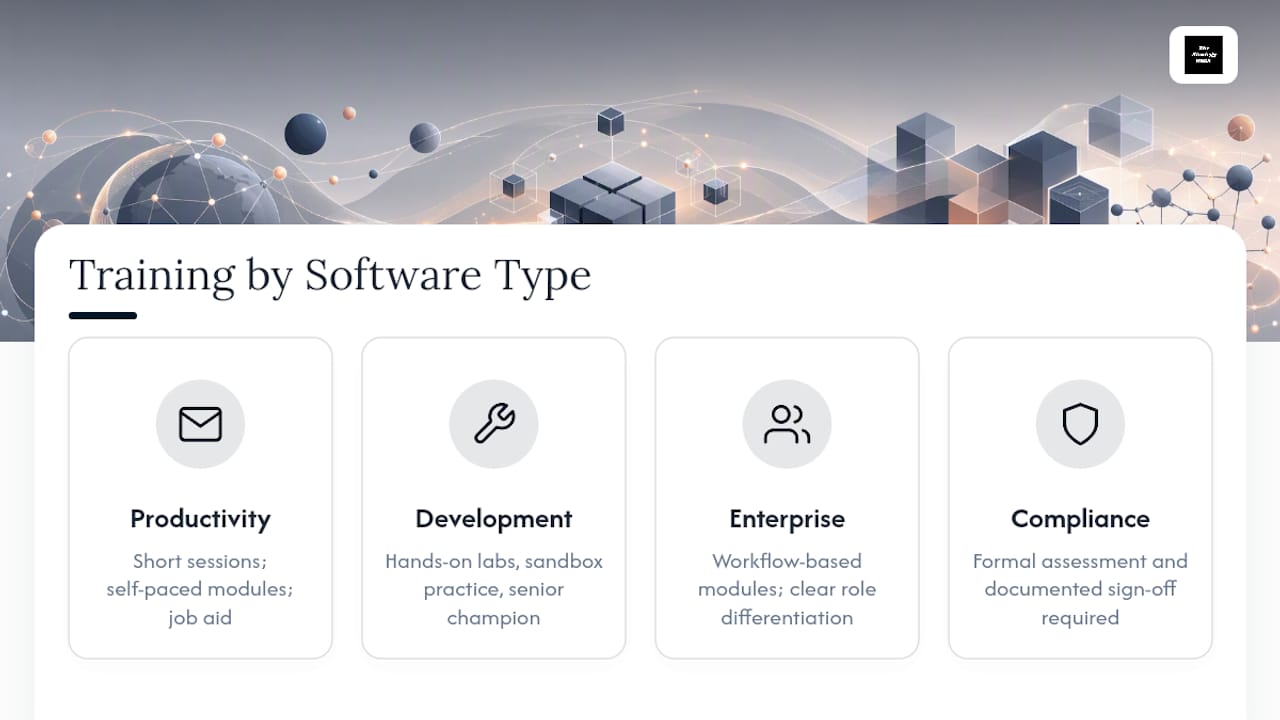
Productivity software (email, document editors, basic collaboration tools) usually needs light training: short sessions, self-paced modules, and a job aid. Most employees already have transferable skills from similar tools.
Development tools and platforms need hands-on labs almost exclusively. Passive demonstration doesn't transfer to writing code or configuring a pipeline. Budget more time for sandbox practice and pair it with a senior developer as an internal champion.
Enterprise applications (ERP, CRM, HR systems) sit in the middle but lean complex. These tools touch multiple departments, so role differentiation matters more here than anywhere else. A finance user and a warehouse user might touch the same ERP but need almost entirely different modules. Build the training plan around workflows, not the software's menu structure, since employees think in terms of "how do I close a purchase order," not "which tab is that in."
Compliance-heavy software, anything touching financial reporting, health data, or regulated processes, needs formal assessment and documented sign-off regardless of how simple the interface looks. The complexity of the software and the complexity of the compliance requirement don't always match, and the training plan needs to account for both separately.
Tailoring Training for Different Learner Skills and Styles
Not everyone learns a new system the same way, and treating a training plan as one-size-fits-all is how half the room disengages by minute twenty.
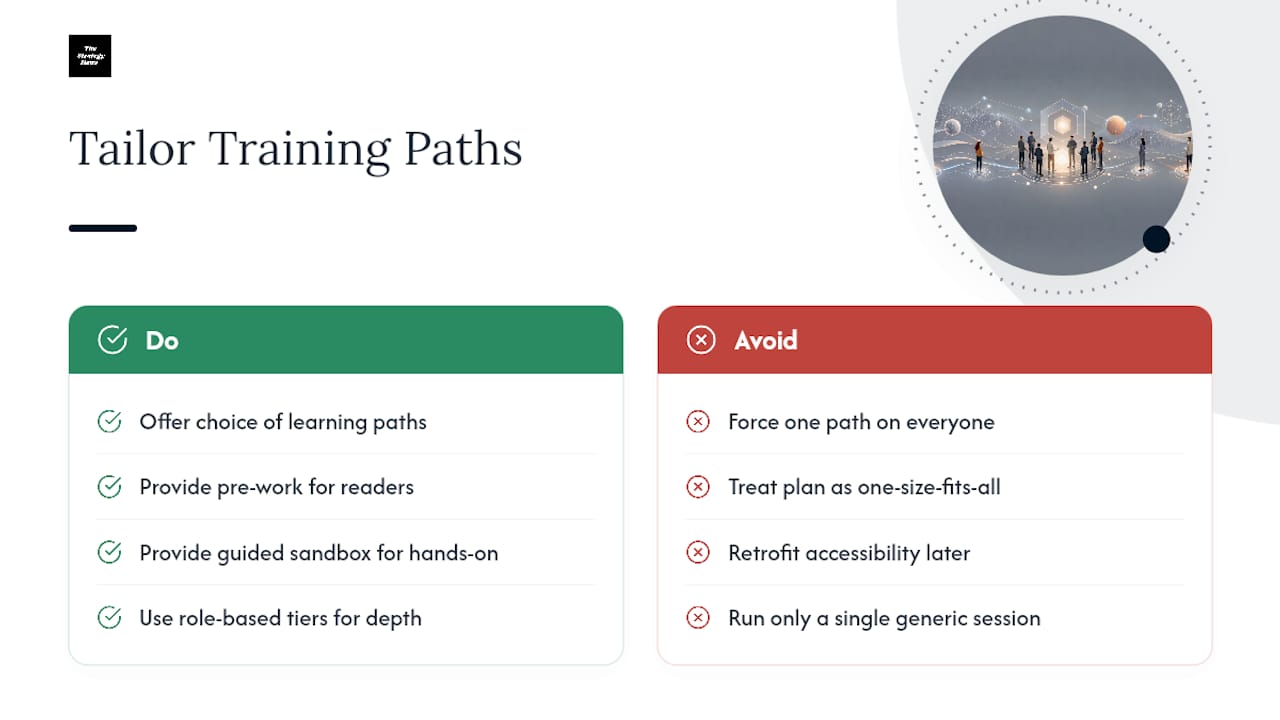
Some learners need to read instructions before touching the software. Others need to click around first and read documentation only when stuck. Build pre-work for the readers and a guided sandbox exploration option for the hands-on group, and let people choose rather than forcing one path on everyone.
Skill level matters as much as learning style. A learner who's used three similar CRMs before will resent a slow walkthrough of basic navigation. Someone who's never used business software at all needs that walkthrough to avoid getting lost in week one. This is exactly why role-based tiers matter: they let you route people to the right depth without running a separate custom session for every individual.
Language and accessibility needs deserve explicit attention in the plan document, not an afterthought. If your workforce includes non-native English speakers or people using screen readers, build materials with that in mind from the first draft rather than retrofitting after complaints arrive.
Practical accommodation matters more than fancy personalization tech. Offering a recorded session alongside the live one, providing written job aids for people who don't retain spoken instruction well, and letting learners repeat a lab module without penalty all cost little and solve real friction. The goal isn't a personalized plan for every single employee. It's a plan flexible enough that most learning styles find a workable path through it.
Keeping Support and Refresher Training Going After Launch
Training doesn't end when the go-live date passes. Most knowledge decays within weeks if nobody reinforces it, which is why a plan that stops at rollout is an incomplete plan.
Build a support structure into the document itself: a designated help channel, office hours with a champion, or a short FAQ document that grows as real questions come in during the first month. This catches the confusion that live training never fully prevents.
Schedule refresher sessions on a fixed cadence rather than waiting for problems to surface. A 20-minute refresher a month after launch, timed to when the initial excitement fades and daily habits are forming, does more for retention than a longer session up front. Tie refreshers to any product update, too. Software changes more often than most training plans get revised, and a silent feature update can quietly break workflows nobody retrained for.
Treat the training plan as a living document with the same version control discipline you'd apply to any operational process. Set the review cycle, name an owner, and revisit it whenever the software changes meaningfully, not just once a year on autopilot.
Budgeting and Resource Allocation for Training Programs
Training competes for budget against every other line item, so building the case early avoids fighting for scraps after the software purchase is already approved.
Treat training requests as part of the same planning and prioritization process as the software purchase itself, not an afterthought tacked on once the contract is signed. Costs to budget for include instructor time or contractor fees, LMS licensing, sandbox environment costs, printed materials, and the often-overlooked cost of employee time away from regular work during sessions.
Enterprise rollouts typically need a larger line item for pilot testing and champion programs. Small teams can often run lean, using existing staff as trainers and skipping formal LMS licensing in favor of shared documents and recorded sessions. Match the budget to the actual complexity of the software and the size of the affected workforce, not to whatever number sounds appropriately serious in a planning meeting.
Common Challenges in Rolling Out Software Training Plans
Most training plans don't fail because the content was wrong. They fail because of predictable execution problems.
Low attendance and engagement happens when training is scheduled without regard for people's actual workload. Fix it by giving managers advance notice and building sign-off into performance expectations, so training isn't optional in practice even when it's optional on paper.
Content going stale fast is common with software that updates frequently. A plan built for last year's interface confuses more than it helps. Fix it with the version control and review cycle covered earlier, and assign a specific owner responsible for flagging when an update breaks existing modules.
No manager buy-in undermines even a well-designed plan, since employees take cues from their supervisors about whether training actually matters. Fix it by involving managers in the pilot phase so they see the value before their teams go through it.
Measuring nothing leaves you unable to prove the training worked or improve it next time. Fix it with the KPI framework already covered: pick two or three metrics before launch, not after someone asks for a report.
Lessons From Real Software Training Rollouts
Three traps show up in almost every rollout that stalls. The first is skipping the pilot to save time, which just moves the debugging from five people to five hundred. The second is writing objectives around features instead of tasks, so training covers "the reporting module" instead of "how to close the month." The third is treating the plan as finished once training day ends, which guarantees it's outdated by the next release cycle.
Bring in outside execution help when the rollout spans multiple departments with competing priorities, or when nobody internally owns the follow-through past launch day.
The gap between a training plan that sits in a shared drive and one that actually changes behavior is rarely about the content. It's about who owns the follow-through.
— Ashanti
Get Hands-On Help Turning Your Training Plan Into Results
Some consulting firms provide support beyond just writing a plan, offering help through the pilot, rollout, and measurement cycles that prove a training plan's effectiveness.
If your team has the objectives figured out but not the bandwidth to build modules, schedule sessions, or track KPIs after go-live, that gap is exactly where execution support pays off. Consulting partners can work alongside your team to turn the plan into a system: assigning ownership, setting sign-off criteria, and building the measurement framework so the training actually sticks past week one. Reach out through the business strategy and project management services page to request an implementation review and see what hands-on rollout support looks like for your next software launch.
Selected Authoritative Templates and Guidance
For further reading: NASA's minimum training-plan content guidance, Confluence's training plan template, and Microsoft Learn's training resources.
Sources
- 5.15 - Train - Software Training Plan - SW Engineering Handbook Ver C
- Free Training Plan Template | Confluence
- Training Plans: Boost Team Learning (Free Template) 2026
- Is it possible to create engaging software training? - Endurance Learning
- Learning Curves: Effective Training Strategies for Technology Adoption | Aspire