

A software rollout plan is the playbook that gets people actually doing their work in a new tool, not just proof that the software was installed. Deployment ends when the code runs. Rollout ends when a named group of users completes real tasks without help, measured against a specific adoption target you set before launch. This guide gives you an 8-step template to copy.
TL;DR:
- The success of a rollout relies on measuring user behavior and task completion rates, not just deployment timelines or dates.
- Using gate criteria tied to real user tasks, support volume, and workflow validation ensures waves expand only after proven readiness.
- Choosing the appropriate deployment strategy depends on risk factors like blast radius, observability, database impact, and automation capabilities.
- Assigning a dedicated adoption owner and embedding targeted in-app guidance significantly increases long-term software adoption.
- Separating deployment from release, automating rollback processes, and monitoring adoption and operational metrics are critical for stable, lasting implementation.
Table of Contents
- What Is a Software Rollout Plan, and How Is It Different From Deployment?
- The 8-Step Software Rollout Plan Template
- Which Deployment Strategy Fits Your Rollout?
- How Do You Size Waves and Set Rollout Gates?
- How Do You Get People to Actually Adopt New Software?
- How Do You Test and Roll Back a Software Deployment Safely?
- What Metrics Prove a Software Rollout Actually Worked?
- Why Execution, Not the Launch Event, Determines Whether a Rollout Sticks
- Get a Rollout Plan Built for Execution, Not Just Launch Day
- Sources
What Is a Software Rollout Plan, and How Is It Different From Deployment?
Deployment, release, and rollout get used as synonyms, and that mix-up causes real damage on project timelines.
Deployment means the code or system is installed and running in an environment. Release means the new features are visible or active for users. Rollout is the broader plan for moving a defined group of people from an old way of working to a new one, and confirming they made the switch. You can deploy software on a Tuesday and still have a rollout that isn't finished until six weeks later.
You need a full rollout plan whenever you're replacing a tool people already rely on, not just adding an optional feature. A rollout plan covers four high-level phases:
- Prepare — align stakeholders, define success metrics, and stage environments.
- Pilot — test with a small, real group before wider exposure.
- Waves — expand in measured, gated batches.
- Retire — decommission the old system and hand off to normal operations.
The 8-Step Software Rollout Plan Template
Copy this into your project tracker. Each step names an owner, a deliverable, and a gate that must be met before you move forward.
- Define the outcome in users' terms, and pick KPIs. Skip "go live by Q2." Write the outcome as a behavior: "Sales reps log every deal in the new CRM within 24 hours of close." Choose two or three KPIs tied to that behavior, not to the deployment schedule.
- Map your audience and their day-one tasks. List every role affected and the specific task each one must complete on day one. A warehouse lead and a finance clerk need different guidance, even in the same platform.
- Choose your deployment strategy and sequence your waves. Decide whether you're going big bang, rolling, or something more gradual, based on the risk factors covered in the next section.
- Set up environments, data, permissions, and in-app guidance. This is where you build the tooltips, checklists, and access controls users will actually touch.
- Run the pilot and recruit skeptics, not just volunteers. A pilot group of enthusiastic early adopters tells you the software works. A pilot that includes a couple of skeptics tells you where it breaks.
- Run waves against numeric gates, not calendar dates. Move to the next wave only when defined thresholds are met.
- Staff the middle weeks with a named adoption owner. Weeks two through six are where most rollouts quietly die.
- Retire the old system and hand off to business-as-usual. Set a firm shutdown date for the legacy tool once the gate criteria are met, and transfer ownership to the standing team.
Pro Tip: Write your gate criteria before the pilot starts, not after you see the pilot results. Retroactive gates always bend toward whatever number the pilot happened to hit.
Which Deployment Strategy Fits Your Rollout?
Deployment strategy is a business decision, not just a technical one. The choice affects customer experience, revenue exposure, and operational load long after the launch date passes. Every option trades off downtime tolerance, infrastructure budget, rollback speed, and how mature your tooling actually is.
Run your decision through four questions:
- Blast radius: how many users are affected if this goes wrong?
- Observability: can you detect a problem within minutes, or will support tickets tell you first?
- Data-tier impact: does this touch a database schema, or only the application layer?
- Automation maturity: can your team roll back automatically, or does someone need to do it by hand at 2 a.m.?
Rolling deployment is a reasonable default for most organizations. Blue-green deployment suits systems where any downtime is unacceptable. Canary releases paired with feature flags work well when you have the monitoring in place to catch problems in a small slice of users before they spread. That combination is what CircleCI calls progressive delivery, and it's the strongest option when your team already has automated analysis and rollback in place. Without that, a plain rolling update plus flags is the safer starting point.
How Do You Size Waves and Set Rollout Gates?
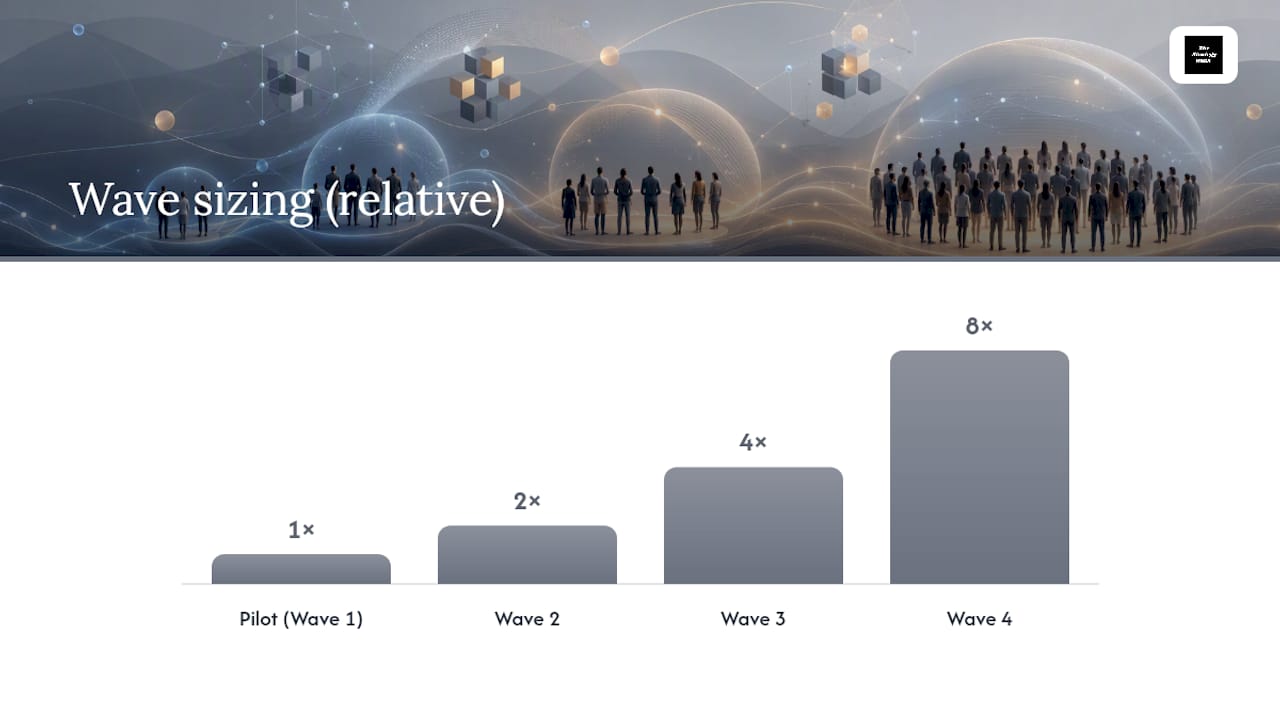
Wave size should follow a heuristic, not a hunch: start with a small pilot group of affected users, then double the group size with each successful wave.
Gates need to be specific enough that someone other than you can check them without a judgment call:
- Task completion rate: a majority of Wave 1 users complete the core task multiple times, unassisted.
- Support ticket volume: open tickets from the new wave stay below a set threshold.
- Critical path validation: the highest-risk workflow runs clean under real production data.
Gate-based progression tied to real user tasks holds up better than calendar-based waves, because a date doesn't know whether the last group actually learned the software. Skipping a gate to hit a deadline is how a single struggling wave turns into a companywide support crisis three weeks later.
How Do You Get People to Actually Adopt New Software?
Adoption is a staffing problem disguised as a training problem. Most rollouts fail in the weeks after go-live because no one owns adoption once the launch excitement fades.

Assign one adoption owner for the rollout, plus a local champion inside each wave who can answer the "how do I actually do this" questions before they become tickets. Build short, task-focused guidance directly into the app itself: a tooltip on the exact screen where people get stuck, not a 40-page PDF nobody opens.
Plan for real support coverage across weeks two through six, since that stretch is where durable adoption is earned or lost. Every question that comes up more than twice belongs inside the product, not in a support queue.
Pro Tip: Track which in-app tips get dismissed without being read. That's usually your clearest signal the guidance is in the wrong place, not that users are ignoring it.
How Do You Test and Roll Back a Software Deployment Safely?
Keep deploy and release separate. Get the code running first, then use feature flags to decide who actually sees it. This separation lets you deploy without exposing risk to the whole user base at once.
Build rollback as an automated path, not a manual scramble, aiming for a rollback time measured in minutes. Validation should run at two levels:
- Quick manual checks on machines untouched by the new deployment, confirming nothing broke elsewhere.
- Deeper health checks tied to actual business workflows, not just server uptime.
Handle database changes separately using an expand-migrate-contract pattern, since bundling schema changes with application deploys is a common cause of rollbacks that can't be reversed cleanly.
What Metrics Prove a Software Rollout Actually Worked?
Track adoption and operations side by side, because a technically clean deployment with no adoption is still a failed rollout.
- Adoption metrics: task completion rate, active users per wave, time-to-first-success for a new user.
- Operational metrics: error rate, latency percentiles, and support ticket volume.
Set an observation window of two to four weeks per wave before declaring it stable, and define an escalation rule in advance, such as pausing the next wave if support tickets exceed a set number in 48 hours. Fast, automated rollback breaks the hesitation cycle that pushes teams toward larger, riskier releases instead of smaller, safer batches.
Why Execution, Not the Launch Event, Determines Whether a Rollout Sticks
A perfect go-live day means almost nothing if week four has no owner watching adoption numbers. The organizations that get this right treat the rollout plan as a living document with named accountability, not a slide deck retired the moment the software goes live.
What gets missed most often isn't the technical deployment. It's the unglamorous work of staffing the middle weeks, writing gates that can't be argued with, and building guidance into the product itself instead of a training deck nobody reopens. That discipline is what separates a rollout that sticks from one that quietly reverts to spreadsheets within a quarter.
— Ashanti
Get a Rollout Plan Built for Execution, Not Just Launch Day
Most rollout advice stops at deployment day. Thestrategyhaus builds the part that actually determines whether your team adopts the new system: named ownership, in-app guidance, and gate criteria that hold up under pressure.
Thestrategyhaus works with organizations planning rollout strategy, assigning adoption ownership, building in-app guidance, and running full implementation support when a plan needs hands-on execution, not just a template. If you'd rather not build gate criteria and wave sequencing from scratch, Thestrategyhaus's project management and implementation services can build the plan with you and stay on through the middle weeks where most rollouts stall. Start by reviewing your current launch plan against the gate criteria in this guide, then reach out to scope what execution support would look like for your rollout.
Sources
- Deployment strategies: Types, trade-offs, and how to choose - CircleCI
- 6 Deployment Strategies (and How to Choose the Best for You) | LaunchDarkly
- Decoupling feature releases from deployment — ConfigCat (blog)
- Enterprise Software Rollout Strategies: Choosing Your Path