

A resource allocation plan is a time-phased schedule that maps named people, equipment, and budget to specific tasks, with utilization checks built in, to catch overload before it happens. Its purpose is simple: show who does what, when, and at what percent of effort. If you're starting one today, open a template and fill in two things first: a short resource inventory and a week-by-week task list.
TL;DR:
- Effective resource planning requires a comprehensive inventory of all skills, roles, equipment, and available capacity, including planned time off and buffers.
- Overcommitments often go unnoticed in spreadsheets when total allocation exceeds 100 percent, emphasizing the need for cross-functional communication.
- Conflict resolution should follow a clear priority-based process, including reprioritization, smoothing, leveling, reassigning, and capacity addition, with explicit decision ownership.
- Regular reviews of utilization, actual hours versus planned, and unresolved conflicts are essential, with a weekly cadence for active projects and quarterly for portfolio alignment.
- Templates like allocation matrices and capacity planning tools support small teams and complex portfolios, but ongoing governance and support are crucial to sustain Accuracy.
Table of Contents
- What Goes Into a Resource Allocation Plan?
- How Do You Build a Resource Allocation Plan Step by Step?
- Which Templates and Tools Fit a Resource Allocation Plan?
- How Do You Resolve Resource Conflicts Fairly?
- How Often Should You Review a Resource Allocation Plan?
- What Does a Resource Allocation Plan Look Like in Practice?
- What Execution Failures Actually Look Like
- How Thestrategyhaus Turns Allocation Plans Into Working Systems
- Where to Go for Templates and Definitions
- Sources
- FAQ
What Goes Into a Resource Allocation Plan?
A resource allocation plan works only if it captures the right inputs before anyone starts scheduling. Skip the inventory step and you'll spend the whole project reacting instead of planning.
Start with a resource inventory. List every person, role, skill set, piece of equipment, software license, and budget line the project might touch. Miss a specialized skill here, and you won't discover the gap until a task is already late.
Next comes the time-phased schedule. This maps each resource to specific tasks across weeks or project phases, and it has to account for dependencies. A developer can't start integration testing before the build is done, no matter how open their calendar looks.
Then you need utilization math. This is where most plans quietly fail. Calculating percent allocation is straightforward: divide hours assigned by hours available in that period. The trouble starts when you add up a person's assignments across multiple projects and the row total clears 100%. That's not a rounding error. That's a resource who is already overcommitted before the project even kicks off.
Finally, build a prioritized project list with conflict-resolution rules attached. When two initiatives both need your only database architect in the same week, someone has to have already decided which project wins. Waiting until the conflict happens to figure that out wastes days.
A workable resource allocation plan generally includes:
- A resource inventory with roles, skills, and availability windows
- A time-phased schedule showing task assignments by week or phase
- Utilization percentages for every resource, flagged when they exceed 100%
- A ranked project list with named decision owners for conflict calls
This structure lines up with how project management texts define the discipline: identifying resources needed for project activities and assigning them based on both availability and actual need, not just who happens to be free.
How Do You Build a Resource Allocation Plan Step by Step?
Building a plan from scratch doesn't require a dedicated software rollout. A spreadsheet and a clear sequence get most teams to a working draft in a single working session.
- Clarify objectives and rank projects. Before you touch a calendar, decide which initiatives matter most. If leadership hasn't ranked priorities, do it now. Every later conflict traces back to this list.
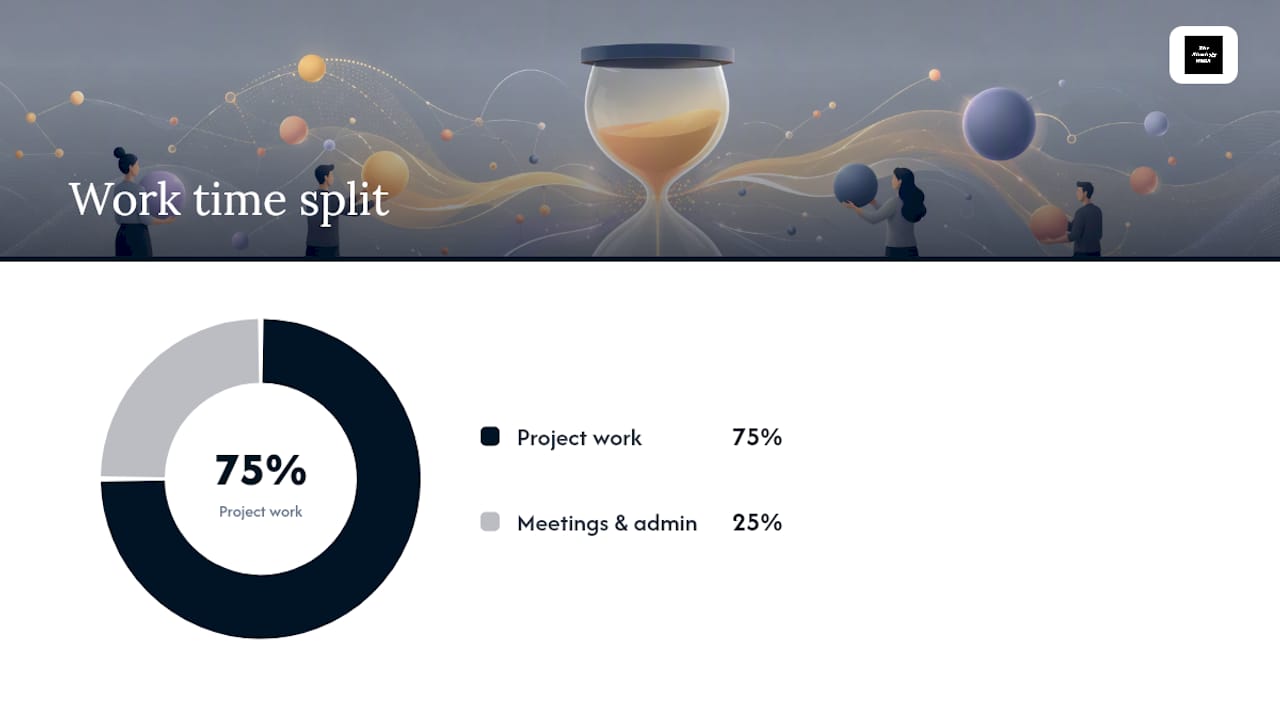
- Inventory resources and validate availability. List people, roles, and skills, then confirm actual availability, not assumed availability. Factor in planned time off, training days, and a realistic buffer, since administrative work and meetings alone consume a significant portion of the calendar most plans never fully account for.
- Estimate task-level demand. Break each project into tasks and convert the work into hours or FTE percentage per period. Round up, not down. Optimistic estimates are where most plans start drifting from day one.
- Populate the allocation matrix. Enter every assignment into rows and columns, then sum each resource's row across all active projects. Any total over 100% is a conflict, not a rounding issue.
- Resolve conflicts using a stepwise sequence. Work through reprioritize, then smooth, then level, then reassign, then add capacity, in that order, before accepting a schedule slip as the answer.
- Publish, get sign-off, and set a review cadence. A plan nobody has agreed to isn't a plan. Circulate it, get explicit sign-off from resource owners, and lock in when you'll revisit it.
Step two is where plans quietly break. A spreadsheet shows a developer at 60% allocated and looks fine, but it can't see that she's covering for a teammate's parental leave next month or that her manager already promised her time to a different initiative. Surfacing constraints like these requires actually talking to cross-functional leads who know about time off, skill bottlenecks, and competing commitments a spreadsheet was never going to catch.
Pro Tip: Build your buffer before you build your schedule. Assume any full-time resource has roughly between seventy and eighty percent of their calendar available for project work once meetings and administrative tasks are subtracted, then allocate against that number rather than the full 40 hours.
Which Templates and Tools Fit a Resource Allocation Plan?
The right template depends on what you're trying to see. A matrix answers "who is overloaded." A Gantt chart answers "what happens if this task slips." Pick based on the question you're actually asking, not habit.
The allocation matrix is the workhorse. Rows list resources, columns list weeks or phases, and each cell holds either a percentage or a raw hour count. Summing across a row is how you catch over-allocation, since any resource whose row total clears 100% forces the prioritization conversation immediately instead of three weeks later when the deadline is at risk.
A Gantt or time-phased schedule matters most when dependencies and critical path drive the timeline. If Task B can't start until Task A finishes, a flat allocation table won't show you the cascading risk. A Gantt view will.
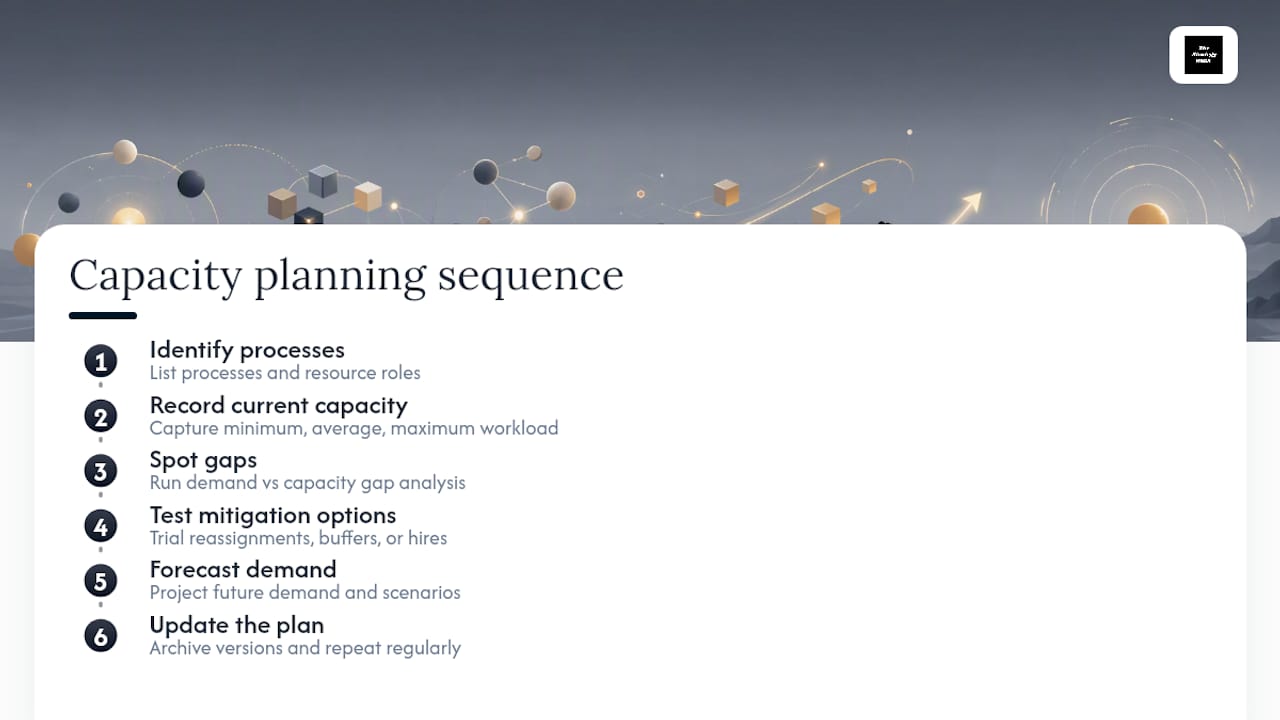
A solid capacity planning template goes further than a simple matrix. It should track minimum, average, and maximum workload per resource, run a gap analysis between demand and available capacity, and list mitigation options for the gaps it finds. Capacity templates generally walk through identifying processes, recording current capacity, spotting gaps, testing solutions, and forecasting demand, then updating the plan on a recurring basis rather than treating it as a one-time document. A Google Sheets version of this approach adds version archiving, so you can see how capacity assumptions shifted over time.
As for tools: spreadsheets handle single projects and small teams fine. Once you're juggling multiple concurrent projects with shared resources, a dedicated resource-management or portfolio tool earns its cost. For firms coordinating specialized consultants on tight cadences, a structured weekly coordination checklist offers a useful template for keeping time-phased schedules current without a full software migration.
How Do You Resolve Resource Conflicts Fairly?
Conflicts aren't a sign your plan failed. They're a sign your plan is doing its job by surfacing scarcity early instead of letting it surface as a missed deadline.
Tie every allocation decision to your ranked priority list, and name a specific decision owner for each project before conflicts happen. Without an owner, conflicts stall in email threads for days while two project leads politely argue past each other.
When a conflict does appear, work through it in this order:
- Reprioritize the lower-ranked project's timeline so the resource frees up naturally.
- Smooth the schedule by shifting non-critical tasks into available float without changing the end date.
- Level by accepting a modest slip on a task that isn't on the critical path.
- Reassign the work to another qualified resource, even if it means a short ramp-up cost.
- Add capacity, through overtime, contractors, or a new hire, only when the four steps above genuinely don't work.
Two supporting heuristics help here. Role-based allocation, assigning by function rather than by name wherever skills overlap, gives you more reassignment options when conflicts hit. Critical-path-first allocation protects the tasks that actually drive your deadline, so you're never trading a real slip for a cosmetic one.
Document every resolution in a conflict log: what happened, who decided, and why. This isn't paperwork for its own sake. A conflict log is what lets you explain to a stakeholder six weeks later why their project slipped a week, backed by a specific decision rather than a shrug. The IBM framework for resource allocation treats resource leveling and prioritization as core, ongoing disciplines, not one-time fixes you set and forget.
How Often Should You Review a Resource Allocation Plan?
A plan that isn't reviewed on a schedule drifts within weeks. The team members change, priorities shift, and the neat matrix you built stops matching reality.
Track four numbers on a recurring basis: utilization percentage per resource, planned hours versus actual hours logged, the count of unresolved conflicts sitting in your log, and any emerging skill gaps. When actual hours consistently run 20 to 30% above planned for a given resource, that's not noise. That's a sign your original estimate was optimistic, and the pattern will repeat on the next project unless you adjust the baseline.
Match your review cadence to the stakes:
- Weekly micro-checks for active project teams, where a five-minute standing agenda item catches drift before it compounds.
- Monthly reviews for full project plans, checking utilization trends and updating the allocation matrix against actual progress.
- Quarterly reviews for portfolio-level alignment, confirming resource investment still matches organizational priorities.
Administrative overhead alone consumes 20 to 30% of available working time on most teams, which is exactly why treating allocation as a standing agenda item, not a quarterly afterthought, keeps plans honest.
When you report status to stakeholders, skip the raw spreadsheet. A one-page summary showing utilization by team, top three conflicts, and planned resolutions communicates more in thirty seconds than a shared spreadsheet link ever will.
What Does a Resource Allocation Plan Look Like in Practice?
Picture a three-month product feature launch with a fixed budget and a hard external deadline. The core team includes one senior engineer, two mid-level engineers, one designer, and a part-time QA analyst.
- Set the constraints. Twelve weeks, fixed budget, no additional headcount approved. The senior engineer is also supporting a separate maintenance project at 30% time.
- Build the allocation snapshot. Weeks 1 through 4: senior engineer at 70% (feature architecture) plus 30% (maintenance), mid-level engineers at 90% each on core build, designer at 100% on UI work, QA at 20% (early test planning).
- Spot the conflict. By week 5, a critical bug surfaces in the maintenance project, pulling the senior engineer's time up to 130% between the two commitments. The matrix flags it immediately because that row now exceeds 100%.
- Resolve it. Reprioritizing the maintenance bug against the launch timeline isn't an option since it's customer-facing. Reassigning the maintenance work briefly to a mid-level engineer, backed by a short knowledge-transfer session, solves the overload without slipping the launch date.
- Monitor the follow-up. The team adds a specific line item to the weekly check-in: confirm the mid-level engineer's maintenance coverage doesn't cascade into their own core-build tasks. It doesn't, and the launch ships on schedule.
The whole resolution took one conversation and a fifteen-minute matrix update, not a re-planning session.
What Execution Failures Actually Look Like
Most resource allocation plans don't fail because the template was wrong. They fail because of three predictable patterns: capacity estimates built on best-case assumptions, an inventory that missed a key skill or dependency, and no governance structure to catch drift once the plan is live.
Optimistic capacity planning is the most common one. A plan that assumes every team member has 40 clean hours a week is a plan that's already wrong on day one. The second failure, incomplete inventory, usually shows up as a surprised "wait, we don't have anyone who knows that system" three weeks into a project. The third, weak governance, is what turns small drift into a missed launch date, because nobody owned the weekly check-in.
Execution-focused support fixes these by pairing the planning template with actual implementation help and a standing review cadence, not just a handoff document. That's the gap between a plan that looks good in a kickoff meeting and one that still holds up in week nine.
— Ashanti
How Thestrategyhaus Turns Allocation Plans Into Working Systems
Building the matrix is the easy part. Keeping it accurate through week nine, when priorities shift and someone quits, is where most teams lose the thread. Some consultancies focus on that second half: not just handing over a template, but staying through implementation and ongoing governance so the plan actually holds.

That means setting up the resource inventory and time-phased schedule with your team, building the conflict-resolution rules into your actual workflow, and establishing the review cadence so drift gets caught at the weekly check-in instead of at the missed deadline. This approach emphasizes execution and support carried through the whole process, not just the upfront framework.
If your team needs hands-on help building or stabilizing a resource allocation plan, work with Thestrategyhaus to scope a custom consulting engagement, or visit the Thestrategyhaus site to see the full range of implementation and systems-setup services available.
Where to Go for Templates and Definitions
For a foundational definition of resource allocation and its core process steps, the Project Management pressbook chapter is a solid starting point. IBM's overview of resource allocation frames the concept alongside capacity planning and resource leveling. For a ready-to-use capacity planning structure, Process Street's template walks through the field-by-field setup. For coordinating specialized consultants on a recurring schedule, the MEP coordination checklist offers a copyable weekly cadence.
Sources
- 8.4 Resource Allocation – Project Management
- Capacity planning template (Process Street)
- What Is Resource Allocation? (IBM)
FAQ
Can you give me an example of resource planning?
A common example is a software team lead mapping three developers, one designer, and a QA analyst against a twelve-week product launch, assigning each person a weekly percent allocation across tasks. When a developer's total allocation across two projects exceeds 100%, the plan flags it as a conflict to resolve before work starts.
What is an example of resource allocation?
Resource allocation happens when a project manager assigns a specific engineer to spend 60% of their time on a new feature build and 40% on maintenance support for the same week. The core definition centers on matching available resources to actual project need, not just splitting hours evenly.
What are the four phases of the resource allocation process?
Most frameworks describe the process as identifying resource requirements, assessing current capacity, prioritizing tasks against those constraints, and creating a visual plan that gets adjusted as priorities shift. This sequence mirrors the core steps used across most project-management guidance.
What are the three types of allocations?
Definitions vary by source, but allocation is commonly split by what's being distributed: people and skills, equipment and physical assets, and budget or financial resources. A complete resource allocation plan tracks all three together, since a task can be blocked by a missing skill just as easily as a missing dollar.
How is resource utilization calculated?
Resource utilization is calculated by dividing the hours a resource is actually assigned to tasks by the total hours available in that period, expressed as a percentage.