

Good process documentation makes work repeatable, not just written down. It cuts onboarding time, keeps output consistent when people leave, and gives you something real to audit or automate later. Start with one practice: pick a single high-impact process, capture it while someone actually performs it, and give it a named owner. Draft it, test it on someone unfamiliar, then publish.
TL;DR:
- Prioritize documenting high-impact processes that occur frequently and pose significant business or compliance risk to maximize your effort.
- Use real task recordings to capture accurate steps and involve unfamiliar testers to identify ambiguities before publishing.
- Assign a dedicated owner and schedule regular reviews—monthly for dynamic processes and quarterly for stable ones—to maintain document relevance.
- Choose appropriate formats like SOPs, checklists, or process maps based on task complexity and decision points, supplementing with recordings for UI updates.
- Keep documentation concise, well-structured, and easily scannable, with metadata and visual aids that facilitate quick understanding and ongoing maintenance.
Table of Contents
- Why Process Documentation Best Practices Matter More Than People Think
- Choosing the Right Format: SOPs, Checklists, Process Maps, and Runbooks
- A Simple Scoring Framework to Decide What to Document First
- The Step-by-Step Workflow: From Capture to a Living Document
- Writing Rules That Keep Documents Skimmable and Maintainable
- Visuals and Tools: Screenshots, Recordings, and Diagrams
- Governance: Who Owns It, How Often It Gets Reviewed, and When to Delete It
- A Copyable Template and Publish Checklist
- How an Execution-First Approach Turns Docs Into Real Outcomes
- A Practitioner's Note on Making Documentation Stick
- Where to Read More on Process Documentation
- Sources
Why Process Documentation Best Practices Matter More Than People Think
Documentation earns its keep the moment someone new joins a team or when a key employee leaves. A well-built doc set shortens onboarding, keeps output consistent across shifts or regions, and gives you a stable base for audits or automation projects. When a process lives only in one person's head, the business is one resignation away from chaos.
Most documentation fails for predictable reasons, though. Docs go stale the week after launch because nobody owns them. Content gets buried three folders deep where no one thinks to look. Some teams overcorrect and write 40-page manuals that nobody reads past page two.
- No named owner, so nobody notices when a step changes
- Docs written from memory instead of a real run, full of small inaccuracies
- Storage locations that only the original author can find
- Length mismatched to the task: a five-minute task doesn't need five pages
A small, current set of documents consistently beats a sprawling, outdated library. Google's own documentation style guide argues for a "keep or delete" habit specifically because stale docs erode trust faster than missing docs do. If people stop believing your documentation is accurate, they stop opening it, and you're back to tribal knowledge.
Choosing the Right Format: SOPs, Checklists, Process Maps, and Runbooks
Not every process needs the same treatment. The right format depends on how often the task happens and how many decisions it involves.
A Standard Operating Procedure (SOP) works best for tasks with regulatory weight or compliance risk, where every step needs a documented rationale. A checklist suits high-frequency, low-complexity tasks, like a daily opening routine or a pre-launch review, where speed matters more than explanation. A process map or flowchart earns its place when a task branches into multiple decision paths, especially across departments. A runbook fits operational or technical incidents, where someone under pressure needs the fastest path to resolution. Work instructions go one level deeper than an SOP, spelling out exact clicks or physical motions for a single task.
| Frequency | Low complexity | High complexity |
|---|---|---|
| High frequency | Checklist | SOP with embedded checklist |
| Low frequency | Short SOP | Process map plus runbook |
Static screenshots work fine for stable interfaces. Once a task involves a fast-changing tool or a UI that shifts every few releases, pair the written steps with a short screen recording instead. A short re-record on change beats manually replacing multiple annotated screenshots, according to guidance in Spion's process documentation research.
A Simple Scoring Framework to Decide What to Document First
Trying to document every process at once guarantees you'll finish none of them well. A scoring framework turns a vague backlog into a prioritized list you can actually act on.
- Score frequency from 1 to 5: how often does this process run? A daily task scores near 5; an annual one scores near 1.
- Score complexity from 1 to 5: how many decision points, exceptions, or handoffs does it involve?
- Score business impact from 1 to 5: what happens if this goes wrong, financially or reputationally?
- Add the three scores for each candidate process and rank the list from highest to lowest.
- Document the top three to five before moving to the next batch.
A customer refund process that runs daily (5), involves several approval branches (4), and carries real financial risk (5) scores 14, putting it near the top of any backlog. A quarterly report that's tedious but low-risk might score 6, and it can wait. Spion's guide makes the same point: ten well-maintained documents outperform a hundred abandoned ones. Resist the urge to open twenty docs simultaneously. Finish the top three, publish them, then move down the list.
The Step-by-Step Workflow: From Capture to a Living Document
Writing a process document from memory is how errors get baked in permanently. The workflow below starts with reality and builds outward.
- Capture from a real run. Screen-record the task as it happens, or sit with the subject matter expert while they perform it. This single habit eliminates most of the inaccuracy in first drafts, and it makes future updates far faster because you already have a source recording to reference, a point Spion's process documentation guide makes directly.
- Build the skeleton before writing prose. Every doc needs a title and one-line purpose, a named owner, scope (what it covers and what it doesn't), required inputs and expected outputs, the numbered steps themselves, and a section for exceptions.
- Write one action per step. Use active voice and lead with the verb: "Click Submit," not "The Submit button should be clicked." Add an annotated screenshot only where a screen genuinely needs clarifying, not on every step.
- Run a clarity test before publishing. Hand the draft to someone unfamiliar with the process and watch them try to follow it without help. Where they hesitate or guess, you've found a gap. This single step is arguably the highest-leverage one in the entire workflow, according to ScreenSnap Pro's process documentation guide, because it catches ambiguity that the original author is too close to the task to see.
- Publish with visible metadata. Every doc needs an owner name, a last-reviewed date, and a short version history, plus a scheduled review reminder so it doesn't quietly go stale.
Pro Tip: Keep the raw screen recording from step one even after the doc is published. When the process changes, you re-record instead of rebuilding from scratch, which turns a 30-minute update into a five-minute one.
Skipping the clarity test is the most common shortcut teams take, and it's the one that costs the most later. A document that makes perfect sense to its author but confuses everyone else isn't documentation. It's a private note that happens to be public.
Writing Rules That Keep Documents Skimmable and Maintainable
Readers scan before they read, so the structure has to work at a glance before the words do. Write the Docs recommends descriptive headings, short paragraphs, and examples pulled out from dense reference text, so the exact step someone needs is visible without scrolling through paragraphs of context first.
- Lead each step with the action verb, not the setup
- Keep one process per document; if a decision branches heavily, split it into a linked sub-page instead of nesting it
- Use consistent formatting for numbered steps, warnings, and exceptions across every document in your library
- Avoid internal jargon or team-specific shorthand that a new hire wouldn't recognize
A consistent template does more work than most teams realize. When every document uses the same fields in the same order, readers learn where to look once and never have to relearn it for the next doc, a point Write the Docs backs directly.
| Template field | Purpose |
|---|---|
| Title and one-line purpose | Tells the reader instantly if this is the right doc |
| Owner and last-reviewed date | Signals whether the content can be trusted |
| Scope | Defines what's covered and what isn't |
| Numbered steps | The core instructions, one action each |
| Exceptions | What to do when the standard path doesn't apply |
| Expected output | Confirms the process was completed correctly |
Visuals and Tools: Screenshots, Recordings, and Diagrams
A screenshot only helps if it's cropped tight, annotated with a number or arrow pointing at the exact click, and stripped of any sensitive data like customer names or account numbers before it gets published anywhere shared.
- Flowcharts work best for decision-heavy processes with multiple branches
- Swimlane diagrams earn their complexity when a process crosses several departments or handoff points
- Step-by-step screenshots suit single-owner tasks with a clear linear path
- Store the original screen recording alongside the published doc, not buried in a personal folder, so whoever updates it later doesn't have to start over
Tool choice matters less than consistency. A wiki or internal knowledge base works for publishing and search; a diagramming tool handles the maps and swimlanes; a screen capture or AI-assisted recording tool handles step-level detail. Storing the source recording next to the document it supports, rather than in a separate archive, makes updates far more likely to actually happen. Google's engineering documentation guidance makes this exact point: when the source material lives next to the artifact it describes, maintenance stays cheap instead of becoming a separate project nobody schedules.
Governance: Who Owns It, How Often It Gets Reviewed, and When to Delete It
Documentation without an owner decays quietly. Assign a Directly Responsible Individual to every document, list their name on the page itself, and name at least one reviewer who isn't the author.
- Review fast-moving processes (anything tied to a changing tool or a young team) on a monthly cadence
- Review stable, mature processes quarterly instead of monthly to avoid review fatigue
- Build peer clarity testing into the publish workflow itself, not as an optional extra step
- Set a "keep or delete" rule: if a doc hasn't been touched or referenced in a defined window, someone has to actively decide to keep it, not just let it sit
Google's style guide frames this as an ongoing discipline rather than a one-time cleanup: schedule quick scans regularly and default to deletion for anything obviously stale, rather than hoarding documents "just in case." A small, accurate library that people trust beats a massive one that people have learned to ignore.
A Copyable Template and Publish Checklist
Use this skeleton as a starting point for your next document, then adjust fields as your team's needs evolve.
- Title: one line stating exactly what the process accomplishes
- Owner: name, not a team or department
- Last reviewed: date, updated at every revision
- Scope: what this covers, what it explicitly doesn't
- Steps: numbered, one action per line, active voice
- Exceptions: what to do when a step doesn't apply
Before publishing, confirm four things: a peer unfamiliar with the process has tested it, the metadata fields are filled in, the doc carries searchable tags matching how people actually describe the task, and a review date is scheduled on someone's calendar, not just implied.
How an Execution-First Approach Turns Docs Into Real Outcomes
Documentation only pays off when it connects to who's accountable and what happens next. Consulting firms can work with teams on exactly that connection: aligning owners, handoffs, and accountability so a written process doesn't sit disconnected from the work it's supposed to guide.

That means building lightweight templates that match how your team actually operates, prioritizing which processes to document first based on real business impact, and keeping the review cadence light enough that it survives contact with a busy quarter. Documentation is one input into a larger execution system. On its own, a perfect SOP changes nothing if nobody's accountable for keeping it alive or acting on it.
A Practitioner's Note on Making Documentation Stick
The teams that get documentation right rarely start with an ambitious library. They start with one process, usually the one causing the most repeated confusion, and they fix it properly before touching anything else.
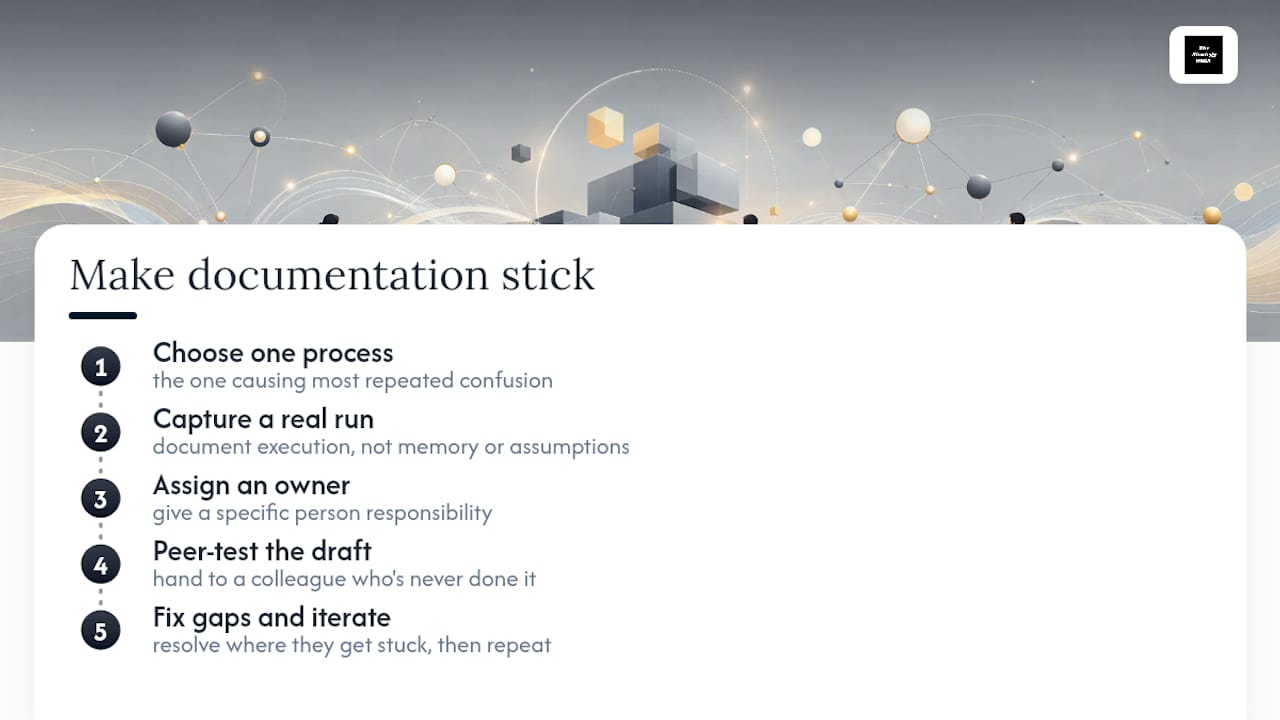
Pick the process people ask about most often. Capture it from a real run, not from memory. Assign someone's name to it. Then hand the draft to a colleague who's never done the task and watch where they get stuck. Fix that gap, and you'll have learned more about writing usable documentation than any framework could teach you.
If your team wants help building that first system out properly, Thestrategyhaus works with organizations on turning documentation and process design into something that actually holds up under real execution pressure.
— Ashanti
Where to Read More on Process Documentation
For deeper reading beyond this guide, Atlassian's process documentation resource covers clarity testing in more depth. Write the Docs offers broader writing principles worth applying beyond process docs specifically. For a service-based operations angle, The Special Wedding Blog's guide to package documentation and JobOS Pro's maintenance plan playbook both show template thinking applied to recurring operational work.
Sources
- Process Documentation: The Complete Guide (2026) | Spion
- Documentation best practices | Google styleguide
- Write the Docs: documentation principles
- Process Documentation Guide 2026: Workflows + Screenshots | ScreenSnap Pro