

Document version control tracks every draft of a document and preserves a clear record of who changed what and when. The reliable approach is a controlled repository, named owners, consistent version numbers, and an audit trail that shows approvals. This article covers the setup steps, platform tools, naming conventions, and retention rules you need to make it work.
TL;DR:
- Version control must use unique identifiers, clear numbering schemes, and retain previous versions to ensure document provenance and compliance; a simple pattern is 0.1 for drafts and 1.0 for approved releases.
- Teams should assign a dedicated version owner responsible for enforcing naming conventions, managing repositories, and overseeing review workflows to maintain system consistency.
- Most tools like SharePoint, Google Docs, and Dropbox support version tracking but often remain underutilized if features are not enabled or workflows are not established.
- Archive obsolete versions separately with clear labels and set retention schedules based on document type and risk to prevent confusion or accidental use of outdated files.
- Automation of approval tracking and audit logs adds value at scale, capturing user activity and timestamps essential for compliance with frameworks like SOX and ISO 9001.
Table of Contents
- What Is Document Version Control, and How Does It Differ From Document Management?
- Why Version Control Matters for Compliance and Collaboration
- How Do You Set Up Document Version Control?
- How Do Version History Tools Work in SharePoint, Google Docs, and Dropbox?
- What Naming and Numbering Conventions Should You Use?
- How Do You Handle Obsolete Versions and Retention?
- Can You Automate Version Control and Audit Logging?
- Making Version Control Stick Inside Your Organization
- Where to Learn More About Document Control Standards
- Sources
What Is Document Version Control, and How Does It Differ From Document Management?
Document management is the broader system for storing, organizing, and retrieving files. Document version control is one piece of that system. It tracks changes to a specific document over time so you always know which draft is current and which one is outdated.
Version control fits inside three common models. A local model keeps versions on one person's device or a shared drive folder, which works for small teams but breaks down fast once more than two people edit the same file. A centralized model stores the master copy in one repository (SharePoint, a document management system) where check-out rules prevent conflicting edits. A distributed model lets multiple people work on copies that later merge, common in software but rare for standard business documents.
In an ISO 9001 quality management system, version control sits under Clause 7.5, which requires that documented information be identified, reviewed, approved, and traceable. That means:
- Every controlled document needs a unique identifier and version number
- Changes require review and approval before release
- Old versions must stay retrievable, not deleted
Why Version Control Matters for Compliance and Collaboration
Multiple active versions of the same document cause real damage. Someone edits an outdated draft, sends it to a client, and the error propagates. A finance team approves a budget based on numbers that were already revised. Rework piles up because nobody can tell which file is authoritative.
Auditors care about this specifically. The Sarbanes-Oxley Act requires audit logs that show user identity, timestamps, and action type for financial controls documentation, and ISO 9001 auditors routinely flag organizations that can't produce approval evidence or a clean version history. That gap is one of the most common findings in document control audits, and it's entirely avoidable with basic version tracking.
The upside runs the other direction too. Clean version control gives you traceability (you can reconstruct exactly how a document evolved), fewer rework cycles, and approval chains that hold up when someone asks "who signed off on this?" Harvard's data management guidance frames this as preserving provenance: the record of a document's origin and every modification made to it.
How Do You Set Up Document Version Control?
Setting up version control doesn't require enterprise software on day one. It requires a short list of decisions made deliberately instead of by default.
- Identify your controlled documents. Not every file needs formal version control. Focus on documents tied to compliance, client deliverables, or operational procedures, and assign a named owner to each one.
- Choose your repository and permission model. Decide where the master copy lives (SharePoint, Google Drive, Dropbox, or a dedicated document management system) and who gets edit, review, or view-only access.
- Define your versioning rules. Set a clear threshold: minor edits (typos, formatting) bump a decimal point; substantive changes (scope, pricing, policy) bump the major number. Separate drafts from approved releases explicitly.
- Design a lightweight change request and approval workflow. One reviewer, one approver, and a documented sign-off step is often enough. Overbuilding this step is why teams abandon version control within a few months.
- Publish, notify, and train. Once a version is approved, notify everyone who uses the document, retire the old copy from active folders, and set a recurring review date (quarterly or annually depending on risk).
Pro Tip: Assign one person as the "version owner" for each document category, even if that person doesn't write the content. Someone has to be accountable for enforcing the naming rules, or they erode within weeks.
How Do Version History Tools Work in SharePoint, Google Docs, and Dropbox?
Most teams already own tools that handle version tracking. The gap usually isn't the software. It's that nobody turned the features on or built a workflow around them.
- SharePoint and Word: SharePoint supports major and minor versioning plus content approval and check-in/check-out controls, which prevent two people from editing the same file at once. Word's built-in version history only works when the file lives in OneDrive or SharePoint rather than a local drive.
- Google Docs: Named versions let you label a specific draft (e.g., "Client Review Draft") and restore it later without losing the automatic revision history running in the background.
- Dropbox: Version history retains prior file states for a set retention window depending on your plan, letting you recover an earlier draft if a file gets overwritten or corrupted.
- Manual methods: If your team doesn't have access to any of these systems, a strict filename convention paired with a version control register can still survive an audit, as long as approval evidence gets captured somewhere.
What Naming and Numbering Conventions Should You Use?
Version numbers should tell you two things at a glance: how mature the document is and whether it's approved for use. A simple, defensible pattern looks like this: drafts run 0.1, 0.2, 0.3 as they move through review; the first approved release becomes 1.0; minor corrections after release become 1.1, 1.2; and a substantive revision, like a policy change or new scope, jumps to 2.0.

Each version also needs metadata recorded alongside it, not buried in the file itself: owner, effective date, and status (draft, in review, approved, obsolete). A minimal register covers exactly this.
How Do You Handle Obsolete Versions and Retention?
Old versions shouldn't disappear, but they also shouldn't sit in the same folder as the current release where someone might grab the wrong one by mistake.
- Move superseded versions to a clearly labeled archive folder and stamp them "OBSOLETE" in the filename or header.
- Set retention triggers based on risk: financial and regulatory documents often need multi-year retention, while internal drafts may only need a few months.
- Review retention schedules on a fixed cadence (annually is common) rather than letting them run indefinitely.
- Restrict edit access to archived folders so nobody can revive or reissue a retired draft by accident.
Public-sector guidance on version control reinforces this same principle: documents need to stay findable and clearly labeled, even after they're retired, so anyone reviewing history later isn't guessing.
Can You Automate Version Control and Audit Logging?
Automation earns its cost once you're managing more documents than one person can track manually, or once auditors start asking for consistent evidence across dozens of files. Below that threshold, manual discipline with a register is usually enough.
Where automation helps most: routing a document to the right approver automatically, sending notifications when a version gets published, and triggering conditional workflows (skip legal review for minor edits, require it for major ones). The highest-value target for automation is capturing approval evidence and the audit trail itself, not automating every administrative click along the way.
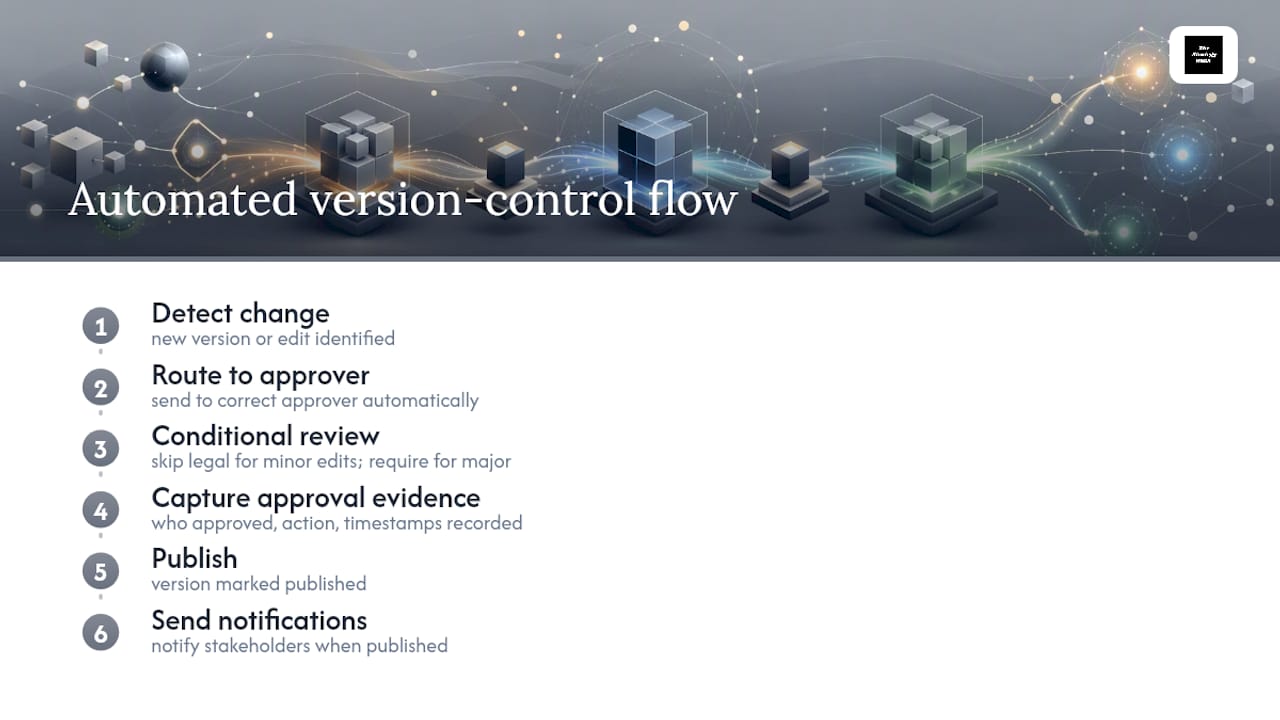
Audit logs need to record who accessed, edited, reviewed, or approved a document, along with timestamps for each action, to satisfy compliance frameworks like SOX.
Pro Tip: Before automating anything, write down exactly what a regulator or auditor would ask to see. Build your automation to produce that evidence first, then layer convenience features on top.
Making Version Control Stick Inside Your Organization
Setting up version control is the easy part. Sustaining it is where most teams lose the thread, usually within a few months, once the person who built the system moves to a new project.
Version control works best when it's tied to how the organization actually operates, not treated as a side project. That means folding version review into existing planning cadences (quarterly business reviews, project kickoffs) instead of leaving it as a standalone compliance task nobody owns. The most common failure Thestrategyhaus sees isn't a bad naming convention. It's a good system built once and never revisited once the initial rollout excitement fades.
Organizations that treat operational systems, including document control, as part of their execution framework tend to hold onto these practices longer than ones that bolt it on as an afterthought.
— Ashanti
Where to Learn More About Document Control Standards
- ISO 9001 document control requirements for identification, review, and retention rules
- SharePoint versioning and approval planning guide from Microsoft
- Word version history setup instructions from Microsoft Support
If your document control process needs the operational structure to actually stick, Thestrategyhaus builds the execution systems, ownership models, and workflows that keep it running long after setup. Teams juggling client-facing repositories alongside internal document control sometimes find it worth pairing this with a dedicated client portal that connects approvals and file access in one place.
Sources
- Plan document versioning, content approval, and check-out controls in SharePointServer — Microsoft
- Use versioning with Word — Microsoft Support
- Version control — Harvard Biomedical Data Management