

A customer onboarding workflow is a defined sequence of owned steps that moves a signed customer to first value on a predictable schedule. Done right, it cuts early churn and shortens time-to-value. Teams that skip the structure lose a significant share of new clients in the first 90 days, according to research from OnboardMap.
TL;DR:
- Customers who reach first value within 30 days are significantly more likely to renew and expand their contracts, making speed a key forecasting metric.
- The standard onboarding process follows seven phases, with clear ownership and SLAs, adaptable to different deal complexities and team capacities.
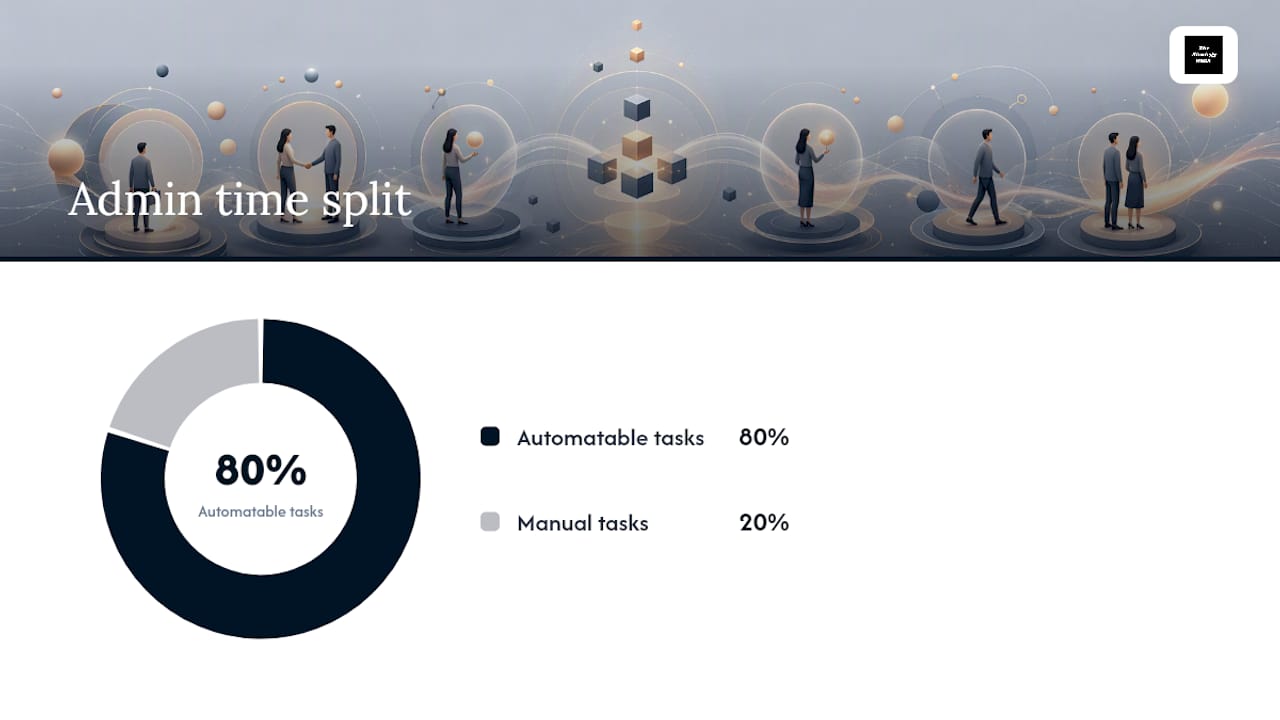
- Automations that send reminders, notify teams, and track document completion free up 80% of admin time but should not replace manual kickoff or escalation conversations.
- Common onboarding failures include delayed access, unclear ownership, and long intake forms, which can be fixed by assigning owners, shortening forms, and setting expectations early.
- Building a structured, workflow-first onboarding playbook with defined outcomes, owners, and automations ensures faster, more predictable customer activation and retention results.
Table of Contents
- Why a Customer Onboarding Workflow Matters More Than You Think
- Which Onboarding Model Fits Your Business
- The 7-Phase Onboarding Playbook You Can Run This Week
- Copy-Ready Templates for Intake and Kickoff
- Which Portal Features and Automations Actually Pay Off
- Building a Dashboard That Warns You Before Churn Happens
- Common Onboarding Failures and How to Fix Them Fast
- How Strategy Haus Builds a Workflow-First Onboarding Playbook
- What I'd Prioritize First if I Were Rebuilding This Today
- How Strategy Haus Helps Teams Build This Workflow
- Sources
- FAQ
Why a Customer Onboarding Workflow Matters More Than You Think
Onboarding quality is a retention lever, not a courtesy step. When a customer stalls in week one, they rarely recover. They quietly disengage, stop responding to check-ins, and churn before the contract's first renewal date. The link between fast onboarding and long-term revenue is direct: customers who reach a working outcome quickly stay longer and buy more.
Five metrics tell you whether your customer onboarding steps are actually working:
- Time-to-first-value (TTFV): the days between signup or signed contract and the customer's first meaningful outcome.
- Onboarding completion rate: the percentage of new customers who finish every required step without dropping off.
- Early churn: the share of customers who cancel within 60 to 90 days of starting.
- Feature or service adoption: how many core capabilities or deliverables the customer actually uses in month one.
- Onboarding CSAT: a short satisfaction score collected right after kickoff, before the relationship settles into routine.
Statistic callout: OnRamp surveyed 182 customer engagement leaders and found that 66% say customers who hit first value within 30 days are significantly more likely to renew and expand their contract, according to OnRamp's 2026 research.
That statistic reframes the whole conversation. Onboarding speed isn't an operations detail. It's a forecasting input for your renewal pipeline. If your average TTFV sits at 45 days, you already know roughly how your next renewal cycle will look, and it won't be encouraging.
Which Onboarding Model Fits Your Business
Not every client onboarding process should look the same. The model depends on deal size, customer complexity, and how much internal capacity you have to babysit each account.
Self-serve onboarding relies on in-app guidance, automated emails, and product tours with minimal human contact. It fits low-cost, high-volume products like freemium SaaS, where the unit economics can't support a dedicated onboarding specialist per account.
High-touch onboarding puts a named human owner on every account from day one, with scheduled calls, custom configuration, and manual check-ins. This is the standard for enterprise software deployments and professional services retainers, where the deal size justifies labor and the customer expects a person, not a sequence of emails.
Hybrid onboarding blends automated intake and document collection with a human-led kickoff and periodic check-ins. Most mid-market B2B companies land here because it balances the operational cost of high-touch service against the risk of losing complex customers to a pure self-serve funnel.
Trade-offs to weigh before you commit to a model:
- Self-serve keeps cost per account low but tolerates almost no confusion in your product's first-use flow.
- High-touch guarantees a human safety net but caps how many accounts one team member can run at once, usually somewhere between 15 and 30 active onboardings depending on complexity.
- Hybrid needs the tightest SLA discipline, since automation and human handoffs have to sync without gaps.
Whichever model you choose, the underlying seven-phase structure below still applies. Only the amount of human time per phase changes.
The 7-Phase Onboarding Playbook You Can Run This Week
A complete client onboarding workflow tends to follow the same seven phases regardless of industry, according to Assembly's onboarding research. What changes is who owns each step and how fast you move through it. Top-performing service firms complete the full sequence rapidly using a single client portal and named document requests, per OnboardMap's playbook data.
Here is the sequence, with triggers, owners, and typical day ranges you can adapt directly:
- Pre-onboarding (Day 0). Trigger: contract signed. Owner: sales or account executive. Output: a welcome link sent within four hours, plus a handoff document to delivery so nothing gets re-discovered during kickoff.
- Contract and payment setup (Day 0–1). Trigger: signed agreement received. Owner: operations or finance. Output: invoice generated, payment method confirmed, access provisioning started.
- Workspace and access setup (Day 1–3). Trigger: payment confirmed. Owner: implementation lead. Output: portal account created, credentials issued, integrations configured.
- Intake (Day 2–5). Trigger: workspace ready. Owner: onboarding specialist. Output: completed intake form, named document requests fulfilled, risk flags surfaced before kickoff.
- Kickoff (Day 5–7). Trigger: intake complete. Owner: account or project lead. Output: kickoff call held, agenda confirmed, goals and success criteria documented in writing.
- Internal handoff and activation (Day 7–10). Trigger: kickoff concluded. Owner: delivery team. Output: first deliverable shipped, customer sees a tangible result inside the product or service.
- Early check-in and first-value confirmation (Day 10–14). Trigger: activation complete. Owner: customer success manager. Output: 15-minute check-in call, TTFV logged, any friction addressed before it compounds.
Each phase needs a named owner, not a department. "Support handles it" is not an owner. "Maria owns intake" is an owner. Vague ownership is one of the most common reasons onboarding stalls, according to OnRamp's research on engagement leaders.
Sequencing matters as much as the steps themselves. Contract and payment setup can run in parallel with workspace provisioning rather than waiting in a strict queue, which shaves two or three days off the total timeline. Intake and document collection can also start before the kickoff call is scheduled, since there's no reason to wait for a meeting to begin gathering information you already know you'll need.
The seven-day version of this playbook works for small to mid-size engagements. Complex enterprise deployments with legal review, security audits, or multi-stakeholder approval chains often stretch phases four through six to 10 or 14 days. The phase structure doesn't change. Only the SLA windows do.
Copy-Ready Templates for Intake and Kickoff
Consistency comes from templates, not memory. A member onboarding process or client onboarding workflow that depends on someone remembering the right questions will eventually skip a step under deadline pressure.
Start with an intake form that surfaces 80% of alignment risk while staying short enough that clients actually finish it, per OnboardMap's intake design guidance. Aim for 10 to 15 minutes of client time, covering these fields:
- Primary point of contact name, title, and preferred communication channel
- Secondary contact for escalations or absences
- Business goal or outcome the client expects within 30 days
- Existing tools or systems that need to integrate with your service
- Team size and roles that will use the product or service
- Budget approval chain, if payment or scope changes are likely
- Prior experience with similar tools or vendors
- Compliance or security requirements specific to their industry
- Preferred meeting cadence for ongoing check-ins
- Success metric they will use to judge the engagement in 90 days
Name document requests specifically rather than asking for "relevant files." Write "Upload your current org chart (PDF or CSV) by Thursday" instead of "please send org information." Attach a deadline to every request, and confirm receipt automatically so the client isn't left wondering if the upload worked.
Your welcome message or portal invite should follow a simple structure: confirm the relationship, state what happens next, and give one clear action. Something like: "Welcome aboard. Your onboarding specialist is [name]. Click below to set up your account and complete a short intake form, no login required."
Pro Tip: Never collect sensitive documents through email attachments. A secure portal with named requests and status tracking eliminates the lost-file problem entirely and gives both sides a paper trail if a dispute comes up later, according to practitioner reporting on customer onboarding.
Which Portal Features and Automations Actually Pay Off
A dedicated client portal outperforms repurposed internal tools like generic project boards for anything customer-facing, because clients shouldn't need training just to upload a file, according to OnboardMap's practitioner findings.
The portal features worth building first:
- A magic-link login so clients never need to remember a password
- Named document requests with visible deadlines and status per item
- A progress bar showing how many onboarding steps remain
- Automatic notifications when a request is fulfilled or overdue
Automate these five things before anything else:
- Reminder emails on day 3, 7, and 10 if a request is still open
- Status notifications to the internal team when a client completes a step
- Handoff triggers that alert delivery the moment sales marks a deal closed
- Calendar links for scheduling kickoff calls without back-and-forth emails
- Confirmation receipts the instant a document uploads successfully
Statistic callout: Automating reminders and status updates while keeping kickoff calls and sensitive decisions manual recovers up to 80% of admin time without damaging client trust, per OnboardMap's operational analysis.
Keep the kickoff call, any pricing or scope conversation, and early escalation handling manual. Clients read automated messages as fine for logistics and jarring for anything that involves judgment or negotiation. A tool like Throughline Automation's business process automation can handle the repetitive back-office pieces so your team's attention goes where a human actually adds value.
Building a Dashboard That Warns You Before Churn Happens
Metrics only help if someone looks at them before the customer already left. A functioning onboarding dashboard puts leading indicators next to lagging ones so a stall shows up as a warning, not a postmortem.
| Metric | Formula | What a worsening trend signals |
|---|---|---|
| Time-to-first-value | Days from signup to first documented outcome | Onboarding steps are too slow or unclear |
| Completion rate | Completed onboardings ÷ started onboardings | Intake or kickoff is losing clients before activation |
| Early churn | Cancellations within 90 days ÷ new customers | Value isn't landing fast enough to justify renewal |
| Feature adoption | Core features used ÷ core features available | Kickoff didn't set the right expectations or training |
| Onboarding CSAT | Average post-kickoff satisfaction score | The human handoff or communication tone needs fixing |
Group time-to-first-value, completion rate, and early churn on one view, since they move together and tell the fastest story about a struggling account. Set an alert when any single account's onboarding passes its expected phase window by more than two days. Standardizing SLAs per phase and tracking these stalled-account alerts moves the needle further than adding more intake fields, according to Assembly's guidance on onboarding structure.
Common Onboarding Failures and How to Fix Them Fast
Most onboarding breakdowns trace back to a small set of repeatable mistakes, not unpredictable bad luck.
- Delayed access. A client waits days for login credentials. Fix: escalate provisioning to a same-day SLA and assign one person to own access requests exclusively.
- Missing owner. No single person is accountable for a phase, so tasks fall through. Fix: name an owner for every phase before the workflow starts, not after something goes wrong.
- Overloaded intake. A 40-field form scares clients into abandoning it halfway through. Fix: cut the form to 10 to 15 fields and move anything optional to a later conversation.
- Unclear expectations. The client doesn't know what "done" looks like for onboarding. Fix: schedule a 15-minute check-in at day 10 specifically to confirm alignment before it turns into a support ticket.
Pro Tip: Treat any account still in intake past its SLA window as a red flag requiring escalation, not a scheduling inconvenience. Waiting to see if it resolves itself is how a two-day delay becomes a lost client.
How Strategy Haus Builds a Workflow-First Onboarding Playbook
The approach used to help teams build this out starts with clarifying outcomes, then mapping the workflow before touching any tools.
- Clarify outcomes: define what "first value" actually means for your specific customer segment.
- Map the workflow: document every phase, trigger, and handoff before automating anything.
- Assign owners and SLAs: name a person for each phase and set a day-range target.
- Implement portal and automations: build the client-facing pieces once the workflow is proven on paper.
- Run early reviews: check the first cohort of onboardings weekly for the first month to catch friction early.
A typical 30-day sprint follows this shape: week one maps the current process and identifies gaps, week two builds templates and assigns owners, week three implements portal automations, and week four runs a live cohort with daily monitoring. Teams can replicate this internally or bring in outside execution support to run it faster.
What I'd Prioritize First if I Were Rebuilding This Today
Time-to-first-value is the one metric I'd protect above everything else. Completion rate and CSAT matter, but they're symptoms. TTFV is the cause. If a customer sees real value inside 30 days, the OnRamp data suggests they're staying and probably expanding. If they don't, no amount of polished welcome emails saves the relationship.
The automation temptation is real, and it's also where teams overcorrect. Automating reminders and status checks is smart. Automating the kickoff call or the moment a client raises a concern is not. Trust gets built in the parts of onboarding that feel slightly inefficient on paper, like a human actually picking up the phone. Cut the busywork. Protect the conversations.
— Ashanti
How Strategy Haus Helps Teams Build This Workflow
Strategy Haus is the direct route to a working customer onboarding workflow when your team already knows the theory but doesn't have the bandwidth to build the playbook, name owners, and wire up the automations yourselves. Rather than handing you another framework to read, the engagement focuses on execution: mapping your current onboarding, designing the phase structure and SLAs specific to your business, and setting up the portal and automation rules that actually reduce admin time.
A typical engagement runs as a short, defined sprint rather than an open-ended retainer: process mapping, template and SLA design, automation setup, and a live cohort review to confirm the new workflow holds up under real customers. The deliverable is a playbook your team owns and can run without outside help going forward. If your onboarding is currently living in scattered email threads and someone's memory, visit Thestrategyhaus to talk through what a structured rebuild would look like for your team.
Sources
- Client Onboarding Guide 2026: The Complete Playbook + Free Templates | OnboardMap
- Client Onboarding Process Flow: Complete Guide With 7 Steps | Assembly
- Customer Onboarding Process: 7 Stages to Reduce Churn in 2026
- Customer onboarding (practitioner insights) | eLearning Industry
FAQ
What Is a Customer Onboarding Workflow?
It's a defined sequence of owned steps, each with a trigger, SLA, and deliverable, that moves a signed customer from contract to first measurable value.
How Long Should Onboarding Take?
Top-performing service firms complete the full sequence in five days or fewer, while complex enterprise deployments with legal or security review often stretch to 10 to 14 days, according to OnboardMap's benchmark data.
What's the Difference Between Self-Serve and High-Touch Onboarding?
Self-serve relies on automated guidance with minimal human contact and fits low-cost, high-volume products, while high-touch assigns a named human owner to every account and fits enterprise or retainer-based engagements.
Which Metric Matters Most for Onboarding Success?
Time-to-first-value is the strongest predictor, since OnRamp's research found that 66% of engagement leaders link a 30-day time-to-value to higher renewal and expansion rates.
Should I Build My Own Onboarding Workflow or Get Help?
Teams with a clear process and internal bandwidth can build it themselves using the playbook structure above; teams that need it running faster or lack the internal time often bring in execution support, such as the sprint-based approach Strategy Haus uses.