

An API integration strategy is the documented plan that decides who owns data, which integration patterns to use, and how integrations are measured. It exists so engineering and leadership stop making one-off decisions that create fragile systems. Start now: map your integration estate and assign an owner to every connection point. The rest—patterns, governance, security, and a 90-day roadmap—builds from that single move.
TL;DR:
- Assign ownership to every integration point early to prevent fragility, security gaps, and chaotic deprecation that can cause outages or duplicated efforts.
- Choose a hybrid pattern approach by balancing control for core workflows and speed for commodity automations, while considering the future maintainability of each integration.
- Implement a lightweight but enforceable governance model with clear ownership, versioning, and data standards, supported by automated checks and a developer portal.
- Select authentication methods based on trust level, with separate controls for AI agents, and enforce credentials hygiene to secure sensitive data and actions.
- Develop a 30 to 90-day roadmap starting from mapping existing integrations, selecting patterns, and shipping a measurable controlled slice to validate governance and operational readiness.
Table of Contents
- What Is an API Integration Strategy and Why Does It Matter?
- Which Integration Pattern Fits Your Workflow?
- How Do You Govern APIs Across Their Lifecycle?
- What Authentication Should You Use, and How Do AI Agents Change That?
- How Do You Measure Whether Integrations Are Working?
- What Does a 30, 60, 90 Day Integration Roadmap Look Like?
- What Belongs on a Checklist Before Your First Integration Ships?
- How Strategy Haus Turns Integration Strategy Into Delivery
- The Bottom Line on Getting Started
- How Do You Handle Data Format Differences Between Systems?
- How Do You Keep Integrations Working as You Scale?
- What Should You Budget for an API Integration Project?
- How Do API Management Tools and Platforms Compare?
- Lessons From Executing Integration Strategies
- Ready to Turn Your Integration Roadmap Into Reality?
- Sources
What Is an API Integration Strategy and Why Does It Matter?
An API integration strategy is different from a pile of integrations that happened to get built. Ad hoc integration means a developer solved a specific problem on a Tuesday, using whatever pattern was fastest at the time. A strategy means someone decided, in advance, which systems own which data, how information should move between them, and who gets to change an interface once it's live. That distinction is a leadership decision, not a purely technical one, because it determines how much risk the organization is carrying without knowing it.
A working API integration strategy should answer ownership questions, define what failure looks like for each connection, and specify who can approve a change. Without that clarity, companies end up with five different systems calling the same customer database through five different auth methods, none of which anyone fully understands anymore.
The payoff for getting this right shows up in several concrete ways, including reduced fragility with fewer surprise outages when a vendor changes an endpoint, faster integration cycles because patterns already exist, safer AI adoption through controlled data access by agents and automated systems, and less duplicated work as teams avoid rebuilding connectors that already exist.
The most common failure modes are predictable once you've seen them a few times: nobody owns the integration once the original developer leaves, authentication is inconsistent across systems built at different times, and deprecation happens by accident when someone deletes an endpoint without checking who still calls it. Organizational friction here has real cost. Research on employee and customer experience consistently ties internal operational clarity to better outcomes downstream, and integration chaos is exactly the kind of internal friction that quietly erodes both.
Which Integration Pattern Fits Your Workflow?
Choosing a pattern is where most teams either save themselves years of pain or create a maintenance headache. Five patterns cover almost everything: direct point-to-point API calls, integration platform as a service (iPaaS), event-driven architecture, API gateways, and custom-built services.
Direct calls are the simplest option and the fastest to ship, but they get brittle fast once you have more than a handful of connections. Every new integration adds a new point of failure, and nobody remembers all the dependencies six months later.
iPaaS platforms (tools like Workato, Boomi, or MuleSoft fall in this category) trade some control for speed. They're built for commodity automations, syncing a CRM field to a marketing tool, moving form submissions into a spreadsheet, without writing custom code. The tradeoff is less flexibility for anything genuinely unique to your business.
Event-driven architecture decouples systems by having them publish and subscribe to events rather than calling each other directly. This pattern scales well for high-volume, real-time needs, but it adds operational overhead: you now need to monitor message queues and manage eventual consistency issues.
API gateways sit in front of your APIs to handle authentication, rate limiting, and routing in one place. They're less a replacement for the patterns above and more a control layer that makes any of them safer to operate at scale.
Custom services make sense when the workflow is core to how your business makes money and you need full control over behavior, versioning, and data handling.
Here's the trade-off that matters most: coupling versus speed. Direct calls and custom services give you control but cost more in engineering time. iPaaS and event-driven patterns ship faster but distribute complexity in ways that are harder to see until something breaks.
- Commodity, low-risk automations: iPaaS
- Core revenue or customer-facing workflows: owned custom services
- High-volume, real-time data needs: event-driven
- Anything exposed externally or to AI agents: gateway in front, regardless of pattern
A hybrid approach tends to work best in practice. Enterprises that put commodity automations on iPaaS and keep core workflows as owned services get speed where it's low-risk and control where it counts.
Pro Tip: Before picking a pattern, ask who will maintain this integration in eighteen months. If the honest answer is "whoever's still around," you're choosing the wrong pattern for that workflow's importance.
How Do You Govern APIs Across Their Lifecycle?
Governance fails most often not because nobody wrote the rules, but because nobody enforces them once the initial excitement fades. A workable governance model starts with ownership assigned at the system level. Whoever owns the system of record for a given dataset also owns the API that exposes it. Product teams that consume APIs for their own features get a say in design, but they don't own the interface itself.
A minimum governance checklist looks like this:
- Authentication standard defined per API tier (internal, partner, public).
- Versioning policy stating how breaking changes are announced and how long old versions stay live.
- Deprecation process with a fixed notice period, typically 90 to 180 days depending on how many consumers exist.
- Naming and data contract conventions so every team doesn't invent its own schema style.
- A registered owner for every API, listed somewhere more durable than a Slack thread.
Enforcement is where most governance documents die quietly on a wiki page. The teams that actually make this stick use a few mechanisms together: CI linting that blocks a build if an API schema violates naming or versioning rules, an API catalog that flags undocumented or orphaned endpoints, and a governance dashboard that surfaces which APIs are approaching version sunset dates. A complete API strategy treats the developer portal and catalog as core infrastructure, not optional documentation, because discoverability is what keeps governance from becoming theoretical.
None of this needs to be heavyweight. A two-page policy document enforced by three automated checks beats a fifty-page governance framework nobody reads.
What Authentication Should You Use, and How Do AI Agents Change That?
Security choices in an API strategy aren't a checklist item bolted on at the end. They're strategic decisions about who gets access to what, and increasingly, whether that "who" is a person or a piece of software acting on its own.
For human-facing and service-to-service traffic, the standard choices are OAuth 2.0 (with client credentials or authorization code flow depending on context), mutual TLS for high-trust service-to-service links, API keys for low-risk internal tools, and JWTs for stateless session validation. None of these is universally "best." OAuth 2.0 fits partner and third-party access well; mTLS fits internal service meshes where both ends need to verify identity; API keys are fine for low-stakes internal automation but shouldn't guard anything sensitive.
Credential hygiene matters more than which protocol you pick. Rotate credentials on a schedule, store secrets in a dedicated vault rather than environment files, and grant the minimum access each integration actually needs.
AI agents complicate this in ways most existing auth setups weren't designed for. An API strategy that treats security as strategic rather than a checklist specifically calls out authenticating agent traffic separately from human traffic, so you can attribute actions, apply distinct rate limits, and audit what an agent actually did.
Practical agent controls worth building in now:
- Separate credentials per agent, not a shared service account.
- Rate limits scoped to agent traffic independent of human usage.
- An audit trail that records every action an agent took and why.
- A defined boundary for what data an agent can read versus what it can write or delete.
Statistic Callout: Vendor-neutral strategy guidance increasingly treats agent traffic as its own access category, distinct from both human users and traditional service accounts, precisely because a single compromised or misbehaving agent can act at machine speed across every system it touches.
How Do You Measure Whether Integrations Are Working?
Observability for integrations means tracking signals that tell you something is wrong before a customer notices, and metrics that tell leadership the investment was worth it. These are two different jobs, and most teams only build for the first one.
On the technical side, four signals matter most: request ID propagation so you can trace a single transaction across every system it touches, latency broken down by hop (not just total response time), upstream status codes categorized by type, and error rates split by category rather than lumped into one number.
On the business side, tie integration work to outcomes leadership actually cares about.
| Metric | What it tells you |
|---|---|
| Integrations shipped per quarter | Team velocity and backlog health |
| Time-to-first-call for a new integration | How fast onboarding actually is |
| Cost per API call at scale | Whether volume growth is sustainable |
| Revenue or cost impact per integration | Whether the investment paid off |
| Incident count tied to integration failures | Whether governance is working |
Instrumentation for this doesn't require exotic tooling. Distributed tracing libraries, a centralized logging platform, and a dashboard that pulls rate-limit and error data into one view cover most of what a mid-sized engineering team needs. The goal isn't more dashboards. It's fewer surprises and a clear answer when someone in finance asks whether the integration budget is working.
What Does a 30, 60, 90 Day Integration Roadmap Look Like?
A 30 to 90 day roadmap moves a team from "we're not sure what we have" to "we shipped one controlled integration and can prove it worked." Trying to fix everything at once is how most integration strategies stall before they start.
- Days 1 to 30: Map the estate. Inventory every existing integration, who built it, what it touches, and how often it changes. Rank each one by business impact and change frequency, because the highest-risk integrations are usually the ones changing often and touching revenue-critical systems.
- Days 31 to 60: Select patterns and define contracts. Decide which pattern fits your top two or three priority integrations, write data contracts specifying exact field formats and error behavior, and establish a governance baseline covering auth and versioning for those specific APIs.
- Days 61 to 90: Ship one controlled slice. Pick a single workflow, build it with real tests, monitoring, and a rollback plan, and measure the outcome against a baseline. A short, measurable 90-day slice validates your patterns and governance model without betting the whole roadmap on one attempt.
Pro Tip: Pick the controlled slice for measurability first, business impact second. A workflow you can cleanly measure teaches you more about whether your governance model actually works than a flashy integration nobody can evaluate objectively.
What Belongs on a Checklist Before Your First Integration Ships?
Treat your first controlled integration like a distributed system, because that's what it is. Skipping this step is how a promising pilot turns into an on-call nightmare.
Before deploy:
- Data contract documented and reviewed by both sides
- Authentication method chosen and tested
- Idempotency keys implemented so retries don't duplicate actions
- Automated tests covering success, failure, and timeout scenarios
- CI linting checks passing against your naming and versioning standards
At deploy:
- Retries with exponential backoff configured
- Trace IDs propagated across every hop
- Monitoring and alert thresholds set before traffic starts, not after an incident
After deploy:
- Latency and error profile measured against your baseline
- Manual workarounds that the integration replaced formally retired
| Phase | Key deliverable |
|---|---|
| Pre-deploy | Tested contract with idempotency built in |
| Deploy | Retry logic, tracing, and alerting live |
| Post-deploy | Measured performance and retired manual process |
Design for timeouts, retries, and rate limiting before adding features. Skipping that order is how integrations become expensive to operate.
How Strategy Haus Turns Integration Strategy Into Delivery
Most integration strategies die in the gap between the roadmap slide and the actual build. Thestrategyhaus works that gap directly, mapping the 30 to 90 day plan above onto specific owners, deadlines, and checkpoints so the plan survives contact with a real engineering backlog.
- Roadmap facilitation that assigns ownership before design work starts
- Governance setup, including versioning policy and enforcement checkpoints
- Implementation support through the first controlled integration slice
[Case study placeholder: enterprise integration rollout outcomes]
[Case study placeholder: governance program implementation results]
If your team has the engineering capacity but lacks someone dedicated to keeping the roadmap on schedule, that's usually the moment to bring in outside execution support rather than doing it in-house.
The Bottom Line on Getting Started
Map your integration estate and assign real owners before you touch a single pattern decision. That single step prevents most of the governance failures and security gaps covered above. Three moves to make this week: inventory what exists, name an owner for each system, and pick one workflow for your first controlled slice. If your team has the plan but not the bandwidth to execute it, that's the point to bring in outside help.
How Do You Handle Data Format Differences Between Systems?
Every integration eventually runs into the same problem: two systems that describe the same thing differently. One calls it customer_id, another calls it client_reference, and a third stores dates as Unix timestamps while your reporting tool expects ISO 8601 strings.

The fix isn't clever code that guesses at intent. It's an explicit data contract that both sides agree to before a single line gets written. That contract specifies field names, types, required versus optional fields, and exactly what happens when a field is missing or malformed.
For format interoperability specifically, a transformation layer, sometimes a dedicated service, sometimes middleware in your gateway, handles the conversion so neither system has to know how the other one thinks. This keeps your core services clean and lets you swap one system for another later without rewriting every downstream consumer.
JSON has become the default for most modern REST APIs, but you'll still run into XML from older enterprise systems, CSV from legacy exports, and increasingly, Protocol Buffers or Avro in high-throughput event-driven setups. Build your transformation layer to be explicit about which formats it accepts and rejects anything that doesn't match, rather than trying to be permissive and guessing at malformed input.
The teams that get burned here are usually the ones that treated a data contract as documentation instead of an enforced rule. Add schema validation at the boundary, and a malformed payload fails loudly at the door instead of corrupting data three systems downstream.
How Do You Keep Integrations Working as You Scale?
An integration that works fine at ten calls a minute can fall over completely at ten thousand. Scaling isn't just about throughput. It's about keeping the same integration reliable, understandable, and owned as both traffic and team size grow.
The first lever is architectural: move high-volume, latency-tolerant workflows toward event-driven patterns as volume grows, since synchronous point-to-point calls that worked fine at low volume become a bottleneck under load. Rate limiting and caching at the gateway layer absorb traffic spikes without every downstream service needing to handle them individually.
The second lever is organizational, and it's the one teams underestimate. As the number of integrations grows past what one team can track in their heads, the catalog and governance dashboard mentioned earlier stop being nice-to-haves and become the only way anyone knows what exists. Schedule a quarterly integration review where you retire unused connections, flag ones approaching version sunset, and reassign ownership for anything whose original owner has moved teams.
The third lever is testing discipline. Contract tests that run automatically whenever either side of an integration changes catch breaking changes before they hit production, which matters far more at scale than it does with three integrations you can manually verify.
Maintenance isn't a phase that happens after launch. Build the review cadence and ownership reassignment process into your governance checklist from day one, and scaling becomes a matter of volume rather than a crisis every time traffic doubles.
What Should You Budget for an API Integration Project?
Costs break into three buckets that most budget conversations conflate: build cost, platform or tooling cost, and ongoing operational cost. Skipping any one of them is how a project that looked affordable on paper ends up over budget within a year.
Build cost covers engineering time to design, build, and test the integration, and it varies enormously depending on pattern choice. A simple iPaaS connector might take days; a custom service handling complex business logic and data transformation can take months. This is where the pattern decision from earlier directly drives budget, choosing iPaaS for a workflow that genuinely needed a custom service usually means paying for it later in workarounds.
Platform and tooling costs include any iPaaS subscription, API gateway licensing, and observability tooling. These are usually predictable line items, but teams frequently underestimate how usage-based pricing on iPaaS platforms scales as call volume grows.
Ongoing operational cost is the one most budgets miss entirely: the engineering time spent monitoring, patching, and updating integrations after launch. An integration with no assigned owner tends to accumulate technical debt quietly until it breaks, at which point the fix costs far more than routine maintenance would have.
A useful budgeting rule of thumb: for any integration expected to last more than a year, budget ongoing maintenance at roughly 15 to 20% of build cost annually. That figure will vary by complexity, but treating maintenance as a rounding error is the single most common budgeting mistake in integration projects.
How Do API Management Tools and Platforms Compare?
Tool selection should follow your pattern decisions, not precede them. Picking a platform first and then forcing every integration into its model is how organizations end up with the wrong tool solving the wrong problem.
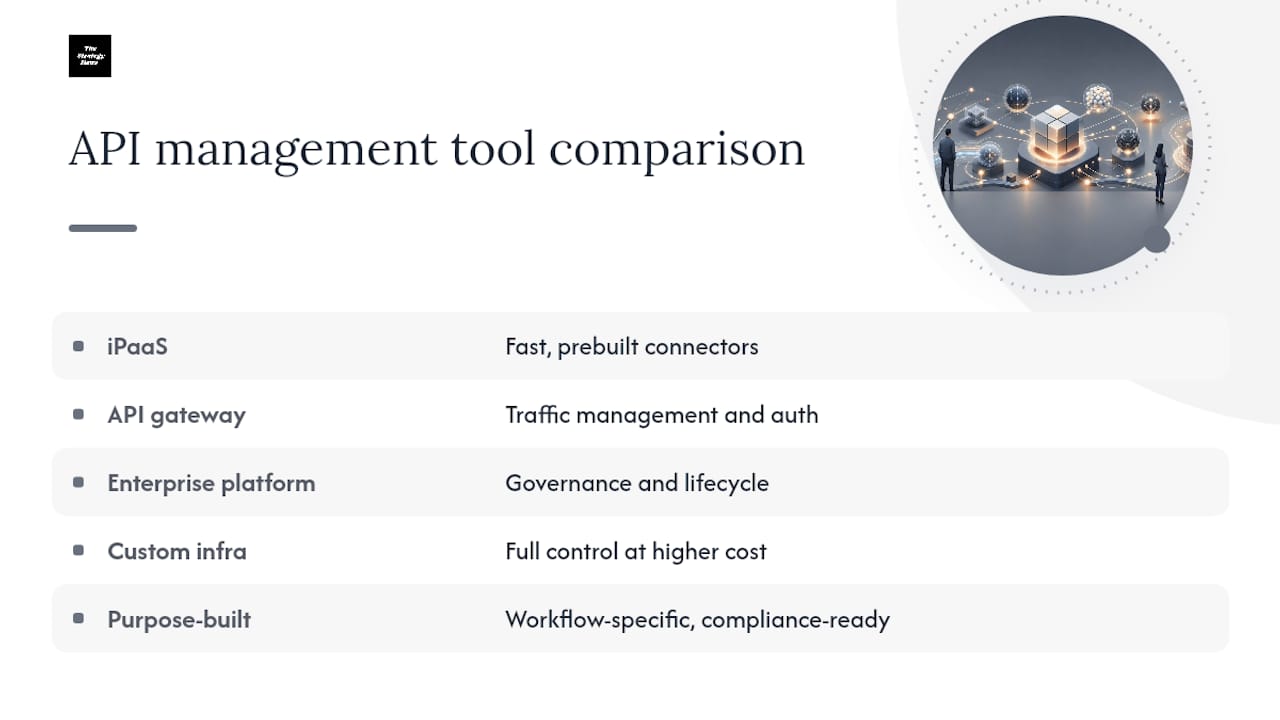
Entry-level integration platforms (the iPaaS category) are built for speed on commodity workflows. They offer prebuilt connectors, visual workflow builders, and minimal setup time, which makes them the right fit for marketing-to-CRM syncs, form submissions, and other automations that aren't core to how the business makes money.
API gateway products handle traffic management, authentication enforcement, and rate limiting in front of whatever APIs you've built, regardless of which pattern created them. They're not a replacement for a pattern decision. They're a control layer that makes any pattern safer at scale.
Enterprise integration platforms add heavier governance, monitoring, and lifecycle management features on top of connector libraries, suited to organizations running dozens or hundreds of integrations that need centralized oversight.
Custom-built infrastructure trades tooling cost for full control, appropriate when your core workflows are unique enough that no platform's assumptions fit well.
For workflows touching revenue or sales operations specifically, purpose-built platforms in that category, like predictive dialer and calling platforms for sales teams, can be a better fit than a general-purpose iPaaS connector, since they're designed around the specific data and compliance needs of that workflow. The same logic applies to client-facing integration work: teams building bespoke client portal integrations often need different tooling than internal automation, since the portal itself is part of the customer experience.
Lessons From Executing Integration Strategies
The gap between a strategy document and a working system is where most integration efforts quietly die. The traps are predictable: teams pick the flashiest pattern instead of the right one, skip the ownership conversation because it's uncomfortable, and treat governance as a document instead of an enforced habit.
Realistic expectations for the first 90 days matter more than ambition. You should expect one working integration with real tests and monitoring, not a transformed integration landscape. Governance after that first slice ships is where most teams lose momentum, because the urgency that drove the initial rollout fades. Sustaining it requires someone whose job includes checking the catalog, not just building new connections.
— Ashanti
Ready to Turn Your Integration Roadmap Into Reality?
Thestrategyhaus is the execution partner for teams that have the integration strategy mapped out but not the bandwidth to run the 90-day rollout themselves. Where most consultancies stop at recommendations, Thestrategyhaus stays through implementation, assigning owners, setting up governance checkpoints, and keeping the first controlled slice on schedule.

Engagements typically start with a roadmap facilitation session that turns your integration estate into a prioritized, owned plan, then move into governance setup and hands-on implementation support through your first shipped integration. Deliverables include a documented ownership model, a versioning and deprecation policy, and a measured outcome from your controlled slice, exactly the evidence leadership needs to fund the next phase.
If your team is stuck between "we know what to do" and "we haven't started," visit Thestrategyhaus to scope an engagement built around your specific integration backlog.
Sources
- API Integration Strategy: CTO Guide to AI-Ready Systems | Agitech
- API Integration Guide: Best Practices for 2026 | Samioda