

AI now improves forecasting accuracy, automates routine reporting, and sharpens risk detection, but it does not replace the project manager. The right approach is treating AI as a copilot: run governed pilots, keep humans on the sign-off, and let the data prove the value before scaling. A systematic review of 97 studies backs this up, and PMI has built formal standards around it.
TL;DR:
- Effective AI in project management relies heavily on clean, well-governed data and clear success metrics before scaling from pilot projects.
- Furthest returns come from automating repetitive admin tasks and improving forecasting accuracy, especially during the planning phase.
- Human checkpoints and sign-off protocols are essential to prevent overconfidence in AI predictions and maintain accountability.
- Selecting the right AI tools depends on integration, explainability, and data security, with low-stakes pilots helping evaluate suitability.
- Prioritize data readiness, metric locking, and structured pilots over tool features to build a reliable foundation for AI adoption.
Table of Contents
- What Does AI in Project Management Actually Mean?
- Where AI Delivers the Most Value Right Now
- How Should a Project Manager Start Adopting AI?
- Which Tools Actually Fit Your Project?
- What Are the Risks and Governance Gaps to Watch?
- Pairing AI Tools With Real Execution Support
- Where to Learn More About AI Standards in PM
- The Real Verdict on AI in Project Management
- Sources
- FAQ
What Does AI in Project Management Actually Mean?
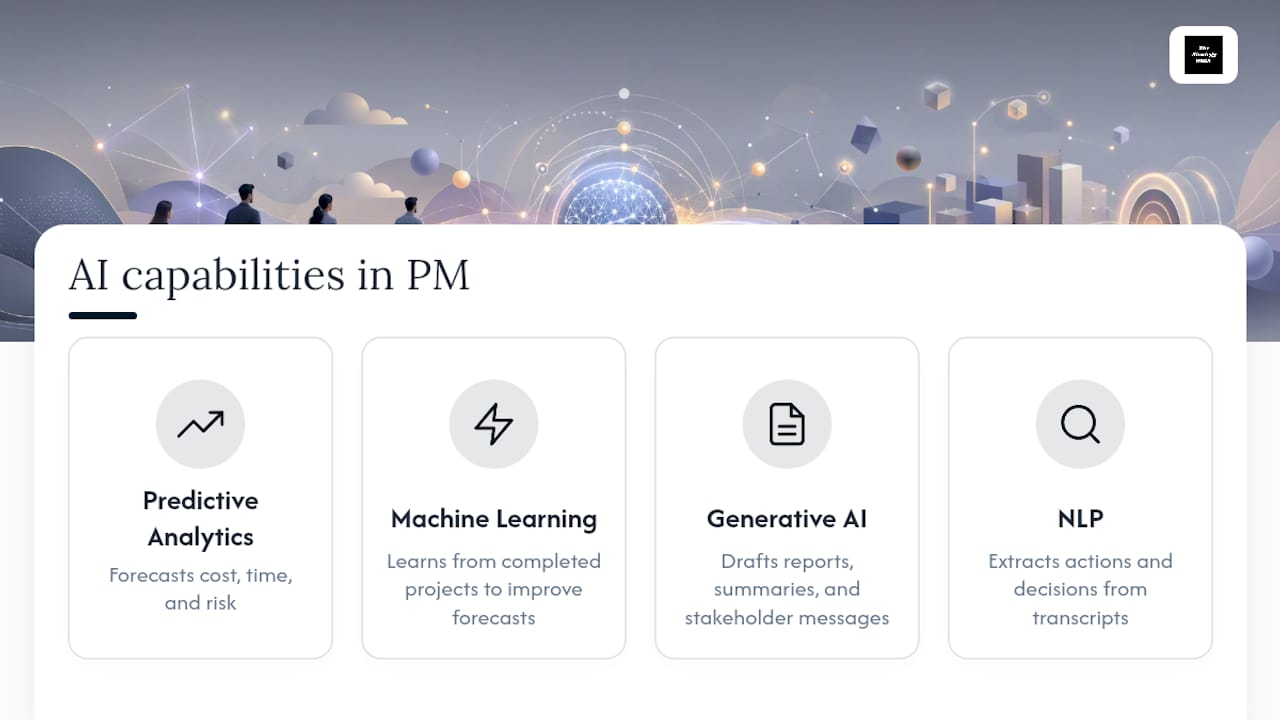
Artificial intelligence in project management covers four distinct capabilities, and mixing them up is where most confusion starts. Predictive analytics uses historical project data to forecast costs, timelines, and risk exposure. Machine learning improves those forecasts over time as it processes more completed projects. Generative AI drafts status reports, meeting summaries, and stakeholder communications. Natural language processing extracts action items and decisions from meeting transcripts or email threads.
Planning is where most teams start, and that is not an accident. The Association for Project Management reports that AI sees its heaviest use during the planning phase, where it processes large data volumes and cuts down uncertainty before a project even kicks off. That matches what the research shows on outcomes: the same systematic review covering studies found AI methods produce measurable gains in cost estimation, duration forecasting, and risk assessment. Execution and monitoring benefit too, but planning is where the data is richest and the payoff comes fastest.
Where AI Delivers the Most Value Right Now
Not every AI application in project management earns its keep. Some deliver fast, visible returns. Others need more data maturity than most teams currently have. Here is where the real impact shows up:
- Predictive forecasting: AI models pull from past project timelines, budgets, and scope changes to flag cost overruns or schedule slips before they happen, though accuracy depends heavily on how clean your historical data is.
- Schedule generation and adaptive replanning: Tools can build a first draft schedule from a project charter and adjust it automatically when a task slips, but a human still needs to check the logic against real constraints like vendor lead times or approval cycles.
- Resource optimization: AI smooths capacity across teams by analyzing skill sets, availability, and workload history, which works best when time tracking data is already reliable.
- Risk detection: Pattern recognition flags early warning signals, like a task with three straight status updates showing "on track" but slipping deadlines, though false positives are common in the early months of use.
- Automated reporting: Generative tools draft weekly status updates and meeting summaries in minutes instead of hours, freeing PMs from the most repetitive part of the job.
- Collaboration assistants: NLP tools scan meeting transcripts and emails to extract action items automatically, cutting down on the "who owns this" confusion that eats up follow up calls.
Practitioners report the fastest return on investment comes from automating repetitive admin work like reports and meeting notes, paired with faster scenario based forecasting for decision making. That combination, low effort automation plus higher quality forecasting, is where most organizations should aim their first real investment.
How Should a Project Manager Start Adopting AI?
Jumping straight to an organization-wide rollout is the fastest way to waste a budget and lose stakeholder trust. A phased approach works better, and it does not need to take a year.
- Pick one focused pilot. Status reporting or schedule generation both work well because they are data rich and low risk if something goes wrong.
- Run a data readiness check first. Identify your sources, assign an owner for data quality, and decide how you will handle missing or inconsistent records before the pilot starts.
- Lock your metrics before you begin. Track forecast accuracy, reporting cycle time, hours saved, and a simple stakeholder trust score, then measure them consistently.
- Build human checkpoints into the workflow. Every AI generated forecast or report needs a defined sign off point and a documented escalation path if something looks wrong.
- Set your scale criteria in advance. Decide what "this pilot worked" looks like numerically before you expand it to a second team.
Pro Tip: Lock your evaluation metric and data schema before the pilot starts, not after. Deciding what "success" means once you already have results is how teams talk themselves into keeping a tool that is not actually working.
PMI's AI in Project Management learning resources and the PMI-CPMAI pathway offer structured frameworks for teams that want a formal certification track alongside their pilot work.
Which Tools Actually Fit Your Project?
Vendor names change every quarter, but the categories stay fairly stable, and understanding them helps you evaluate options without getting distracted by marketing claims. AI-native platforms build forecasting and automation into the core product, which usually means better integration but a steeper switch from legacy systems. Copilot style assistants sit on top of tools you already use, drafting reports and summarizing meetings without touching your core project data. Analytics engines specialize in prediction and risk modeling, often as an add-on to existing platforms rather than a replacement for them.
When evaluating any option, run it against a short checklist:
- Does it integrate with the scheduling and financial systems you already use?
- Can it explain why it flagged a risk or generated a forecast, or is it a black box?
- Where is your data stored, and does that meet your organization's compliance requirements?
- How often is the underlying model updated, and can you control what data feeds it?
Before committing, run a sandbox test with a real but low stakes project. Feed it a sample schedule, ask it to generate a status report, and check the output against what you know to be true. One practical detail worth checking: tools that support direct .mpp file import can cut migration time from months to days when you are moving legacy schedules into a new platform.
What Are the Risks and Governance Gaps to Watch?
AI models are only as reliable as the data behind them, and most project management data has gaps, inconsistencies, or outdated entries that quietly skew every forecast built on top of it. Overconfident predictions are a real problem too. A model can present a schedule risk with false precision, and teams that treat that number as gospel instead of a signal tend to get burned.
Build these guardrails in from day one:
- Require human sign off before any AI generated forecast or report goes to a client or executive sponsor.
- Keep an audit trail of what data fed each decision and who approved the output.
- Revalidate your model's accuracy on a set schedule, not just when something goes wrong.
- Document data lineage so you can trace a bad forecast back to its source.
Pro Tip: Treat every AI output above a certain dollar threshold or schedule risk level as requiring documented human review. Write that threshold down. "Use judgment" is not a policy.
PMI's newly published AI standard gives organizations a formal reference point for moving past ad-hoc AI use toward structured, accountable practice. Multi-expert academic analysis also suggests PM roles will shift meaningfully by 2030 toward ethics-centered oversight of these systems rather than away from human judgment entirely.
Pairing AI Tools With Real Execution Support
AI pilots fail more often from missing structure than missing technology. A tool can generate a flawless forecast and still sit unused if nobody built the workflow, training, or governance around it. This gap often exists between AI pilots and actual strategic objectives and delivery cadence, rather than simply bolting a tool onto a broken process and hoping it holds.
This can include implementation coaching, governance setup, and operational templates that help turn a promising pilot into a system used effectively over time. Automation tools like the ones covered in this guide, including copilot-style assistants for scaling agency work or structured roadmaps for enterprise AI integration, work best when paired with someone managing the execution layer around them.
Where to Learn More About AI Standards in PM
For readers who want primary sources rather than secondhand summaries, three references anchor most of the credible guidance available right now: PMI's AI standard for governance frameworks, APM's guidance on AI in project management for technique definitions and adoption barriers, and the MDPI systematic review for the underlying evidence on forecasting accuracy.
The Real Verdict on AI in Project Management
Most of the advice circulating about AI in project management overpromises. It talks about transformation and disruption when the actual evidence points somewhere more modest and more useful: AI is good at narrow, data-rich tasks and mediocre at everything requiring judgment about people. That is not a knock on the technology. It is a description of what a copilot is supposed to do.
The conventional advice fails PMs in one specific way: it treats tool selection as the hard part. It is not. The hard part is data governance, and most organizations skip straight past it to pick a platform. A pilot built on inconsistent historical data will produce confident, wrong forecasts, and confident wrong forecasts are more dangerous than no forecast at all.
If you take one thing from this guide, prioritize the data readiness check before you evaluate a single vendor. Lock your metrics, assign a data owner, and run a small pilot with a defined end date. Everything else, the tool category, the vendor, the rollout timeline, sorts itself out once that foundation is solid.
— Ashanti
Sources
- Artificial Intelligence in Project Management: Systematic review (MDPI)
- Artificial intelligence in project management | APM
FAQ
Which AI Tool Is Best for Project Management?
There is no single best tool. The right choice depends on whether you need an AI-native platform, a copilot layered on your existing systems, or a dedicated analytics engine for forecasting, so evaluate against integration, explainability, and data security rather than brand reputation.
Will AI Replace the PMO?
No. Evidence and industry guidance both point toward AI augmenting the PMO's forecasting and reporting work, not eliminating the function; human oversight on decisions, ethics, and stakeholder management remains central to the role.
What Are the 3 C's for an AI-Ready Project Manager?
Definitions of this framework vary across sources, so rather than repeat an unverified list, the more reliable near-term priorities are clear: build strong data governance, keep human checkpoints on AI outputs, and run measurable pilots before scaling.
How Long Does an AI Pilot Take to Show Results?
Most focused pilots, like automated status reporting or schedule generation, can show measurable results in a relatively short time if the data readiness check and metrics are locked in before the pilot starts.
Does AI in Project Management Require a New PMI Certification?
Not strictly, but PMI's AI in Project Management learning resources and the PMI-CPMAI pathway give project professionals a structured way to build formal expertise alongside hands-on pilot experience.